🔍 Read the full analysis: AI Workflow Automation In 2026: A Gear Checklist To Get Started on ThorstenMeyerAI.com

Get the little things that make your day delivered free with Prime
- Fast, free delivery on millions of items
- Prime Video, Amazon Music and more included
- Member-only deals all year
TL;DR
ThorstenMeyerAI.com published a gear checklist for people setting up workspaces for recording, calls, file handling and everyday computer use. It names products for four of six categories and advises checking ports, setup and recurring workflow gaps before buying; it does not report test results or claim the gear improves AI performance.
ThorstenMeyerAI.com has published a 2026 gear checklist for people setting up a workspace for recording, calls, file handling and everyday computer use, naming six equipment categories and advising readers to check compatibility before purchasing. The article offers buying considerations rather than testing results, and says users should prioritize the gaps that disrupt their work instead of buying every item at once.
The checklist covers a USB microphone, autofocus webcam, portable SSD, USB-C docking station, ergonomic wireless mouse and uninterruptible power supply. It supplies example products for four categories: the RØDE PodMic USB Dynamic Broadcast Microphone, the SanDisk 2TB Extreme Portable SSD, a Targus USB-C Universal Quad 4K Docking Station with 100W Power Delivery, and an ergonomic wireless mouse whose specific model is not identified in the supplied material. No webcam or UPS model is named.
For the microphone, the article points readers to the product’s USB-C and XLR connections and recommends matching the connection to existing equipment, checking cable reach and making sure there is room to position it. For the SSD, it identifies the named product’s 2TB capacity but advises readers to check connection fit across devices and assess their actual storage needs. The source does not provide independent performance or durability findings for either product.
The dock’s product name refers to USB-C, quad 4K and 100W power delivery. The checklist treats these as specifications to verify against a computer and monitor setup, not as assurances that every combination will work. Its webcam guidance likewise focuses on connection, mounting, software and how the camera behaves from the user’s real working position.
RØDE PodMic USB Dynamic Broadcast Microphone, XLR + USB-C
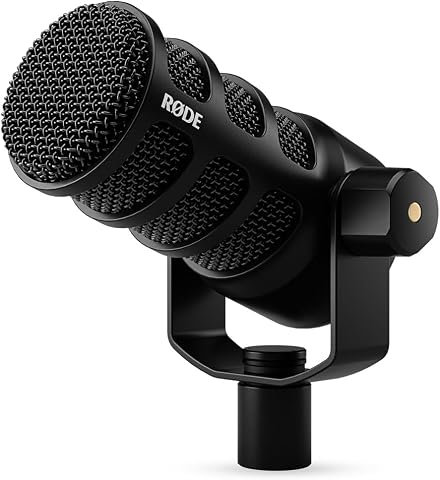
The RØDE PodMic USB is a versatile broadcast microphone with both XLR and USB-C connections, suitable for streaming, podcasts, and recording. It features onboard audio processing with APHEX DSP, noise rejection for speech clarity, and zero-latency monitoring for real-time audio feedback.
Pros:
- Versatile XLR and USB-C connectivity for flexible setup
- Built-in audio processing enhances sound quality
- Effective noise rejection for clear speech
- Zero-latency monitoring for real-time audio
Cons:
- May require additional equipment for professional XLR use
- Bulkier design compared to traditional microphones
Best for: Workspaces that want USB-C and XLR connection options
Not ideal for: Setups that cannot accommodate its listed connections
Bottom line: Choose it when its USB-C or XLR connections fit the equipment and recording workflow you already have.
Build Around Actual Workflow Gaps
The checklist’s practical value is its compatibility-first approach: equipment can add friction if it does not match a computer’s ports, the available desk space or the software in use. Checking those constraints before buying may help readers avoid assembling a workspace around features their setup cannot use.
It also separates categories from necessities. A person who rarely records video may have little reason to prioritize a webcam, while someone who moves project files between computers may care more about portable storage. The source recommends tackling the interruptions that happen most often, rather than treating all six items as a required bundle.
The article is a purchasing checklist, not evidence that these products improve AI output, speed up automated workflows or deliver a particular return on investment. Readers still need to verify product specifications and decide whether a hardware purchase addresses a problem in their own work.
Six Categories, Four Named Picks
The checklist is organized around common workspace tasks: capturing speech, joining video calls, moving files, connecting peripherals, controlling a computer and protecting equipment from power interruptions. It presents the categories as possible components of a workspace, leaving choices dependent on the user’s equipment and routine.
The supplied material gives product names for the microphone, SSD and docking station, and refers to an ergonomic wireless mouse without identifying a model. It gives selection guidance, but no comparative reviews, benchmark figures, price information or documented testing. The source also does not describe a particular software platform or AI application that the gear is designed to support.
“Prioritize the gaps that interrupt your work most often, rather than buying every category at once.”
— ThorstenMeyerAI.com checklist
Product Fit Still Needs Checking
The supplied material does not give a specific publication date, product prices, links to full specifications or evidence of hands-on testing. It also does not identify a webcam or UPS model, and it does not name the ergonomic mouse pick. Those categories are guidance, not specific recommendations, in the material provided.
Compatibility and performance cannot be confirmed from product names alone. The checklist does not specify the reader’s computer, USB-C capabilities, operating setup, display configuration, software or connected devices. It also provides no test results showing how the named gear performs in a particular AI workflow.
Check Specifications Before Buying
Readers can use the list as a starting point by first mapping their existing computer, ports, monitors, software and desk space, then identifying the tasks that cause recurring interruptions. The next step is to compare manufacturer specifications with that setup and confirm cables, mounts and power requirements before ordering.
The source does not announce a product test, follow-up report or planned update. Any decision to buy should depend on current product information and the user’s needs; the checklist itself does not establish that all six categories are necessary.
Key Questions
What gear categories does the checklist include?
It lists a USB microphone, autofocus webcam, portable SSD, USB-C docking station, ergonomic wireless mouse and uninterruptible power supply.
Does the checklist recommend a webcam model?
No. The supplied material gives selection advice about connection, mounting, software and autofocus behavior, but names no webcam product.
Which products are named?
The material names the RØDE PodMic USB Dynamic Broadcast Microphone, the SanDisk 2TB Extreme Portable SSD, and a Targus USB-C Universal Quad 4K Docking Station with 100W Power Delivery. It does not identify a mouse model.
Does the source show that the gear improves AI performance?
No. It is a workspace purchasing checklist, not a performance study. It reports no benchmarks or evidence that the products improve AI output or workflow speed.
Should readers buy all six categories?
The article advises against buying everything at once. It recommends checking compatibility and recurring workflow needs first, then prioritizing the equipment most relevant to the user’s setup.
Source: ThorstenMeyerAI.com