The best HomeKit smart home devices depend on whether you want simple controls, broader automation, or security features. I’d make the Aqara G410 Doorbell Camera the best overall pick for shoppers who want a substantial HomeKit security upgrade, while the TP-Link Tapo P125M stands out for straightforward Matter-based plug control and the meross Outdoor Smart Plug for managing several outdoor connections. The main tradeoff is between easy, low-cost upgrades and more specialized devices that can bring setup requirements or ecosystem limits. Matter support can make a device more flexible, but HomeKit compatibility and feature support still vary by product. Read on for how these eight options compare and which one fits your home.

Get the little things that make your day delivered free with Prime
- Fast, free delivery on millions of items
- Prime Video, Amazon Music and more included
- Member-only deals all year
Key Takeaways
- The Aqara G410 is the most feature-rich HomeKit-focused pick in this lineup, while a smart plug is a simpler first step for shoppers who do not need camera features.
- Matter plugs and HomeKit-labeled plugs are not interchangeable by default: Linkind and Tapo offer Matter connectivity, while the Kasa EP25 is specifically positioned for Apple HomeKit.
- Plug packs favor different kinds of coverage: Linkind and Tapo offer multi-plug bundles for adding several indoor control points, while the EP25 is a single-plug option.
- Specialized devices solve specific problems: the meross garage controller targets an existing garage door, and its outdoor plug is built around controlling multiple outdoor sockets.
- HomeKit compatibility does not make every security system a native HomeKit choice: the SimpliSafe kit should be judged as a separate security ecosystem, not assumed to integrate with Apple Home.
| Linkind Matter Smart Plug, 4-Pack |  | Best Value for Multi-Room Control | Pack size: 4 plugs | Connectivity: Matter; 2.4 GHz Wi-Fi; IPv6 | Compatible platforms: Apple Home, Alexa, Google Home, SmartThings, AiDot | VIEW LATEST PRICE | See Our Full Breakdown |
| Aqara G410 Smart Doorbell Camera with Chime, HomeKit Secure Video, Black |  | Best HomeKit Video Doorbell | Video resolution: 2K; limited to 1600×1200 with HomeKit | Field of view: 175° | Indoor chime volume: 95 dB | VIEW LATEST PRICE | See Our Full Breakdown |
| TP-Link Tapo P125M Matter Smart Plug Mini, 3-Pack |  | Best Compact Matter Plug | Model: Tapo P125M | Pack size: 3 plugs | Connectivity: Matter; Wi-Fi; Bluetooth | VIEW LATEST PRICE | See Our Full Breakdown |
| meross MSG100HK Smart Garage Door Opener Remote |  | Best for HomeKit Garage Access | Model: MSG100HK | Connectivity: 2.4 GHz Wi-Fi | Compatible platforms: Apple HomeKit, Siri, CarPlay, Alexa, Google Assistant, SmartThings | VIEW LATEST PRICE | See Our Full Breakdown |
| Kasa Apple HomeKit Smart Light Switch KS200P3, Single Pole |  | Best Permanent Lighting Upgrade | Model: KS200P3 | Switch type: Single pole, one-way | Operation: On-off | VIEW LATEST PRICE | See Our Full Breakdown |
| Kasa EP25 Mini Smart Plug, 15A, Apple HomeKit Compatible |  | Best Indoor Smart Plug for Energy Monitoring | Model: EP25P4 | Maximum current: 15 A | Maximum wattage: 1800 W | VIEW LATEST PRICE | See Our Full Breakdown |
| meross Outdoor Smart Plug with 3 Independent Sockets |  | Best Outdoor Pick for Controlling Multiple Devices | Model: MSS630 | Sockets: 3 independently controlled | Connectivity: 2.4 GHz Wi-Fi | VIEW LATEST PRICE | See Our Full Breakdown |
| SimpliSafe 8-Piece Wireless Home Security System | 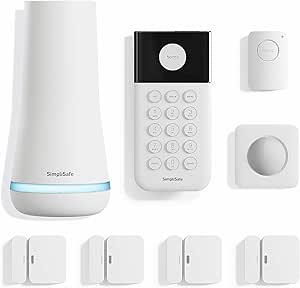 | Best DIY Security System for Non-HomeKit Households | Power source: Battery powered | Connectivity: Wireless | Compatible devices: Smartphone, Alexa, Google Assistant | VIEW LATEST PRICE | See Our Full Breakdown |
| HomeKit smart home device | Connectivity | Model | Maximum wattage |
|---|---|---|---|
| Linkind Matter Smart Plug | Matter; 2.4 GHz Wi-Fi; IPv6 | — | — |
| Aqara G410 Smart Doorbell Came | 2.4 GHz and 5 GHz Wi-Fi; Bluetooth; Zigbee | — | — |
| TP-Link Tapo P125M Matter Smar | Matter; Wi-Fi; Bluetooth | Tapo P125M | 1800 W |
| meross MSG100HK Smart Garage D | 2.4 GHz Wi-Fi | MSG100HK | — |
| Kasa Apple HomeKit Smart Light | 2.4 GHz Wi-Fi | KS200P3 | 600 W |
| Kasa EP25 Mini Smart Plug | 2.4 GHz Wi-Fi | EP25P4 | 1800 W |
| meross Outdoor Smart Plug with | 2.4 GHz Wi-Fi | MSS630 | 1200 W |
| SimpliSafe 8-Piece Wireless Ho | Wireless | — | — |
More Details on Our Top Picks
Linkind Matter Smart Plug, 4-Pack
The Linkind Matter Smart Plug 4-Pack is the practical pick when you want to automate several lamps or small appliances across your home without committing to one smart-home ecosystem. Matter support spans Apple Home, Alexa, Google Home, and SmartThings, while local LAN control can keep supported routines working through an internet outage. Compared with the TP-Link Tapo P125M, Linkind supplies one extra plug, making it better suited to setting up multiple rooms at once. Both are limited to 2.4 GHz Wi-Fi, and Matter control requires a compatible hub. Its 15 A/1800 W capacity and overload and short-circuit protection are useful safeguards, but this is not a way around the limits of your outlet or appliance. Choose it for broad, straightforward plug control; skip it if you need a plug for a 5 GHz-only network.
Pros:- Four plugs make it easier to automate several locations in one setup.
- Matter compatibility supports Apple Home and several other major platforms.
- Local LAN control can remain available during internet outages.
- 15 A/1800 W capacity with overload and short-circuit protection.
Cons:- Matter platform control requires a compatible hub.
- Connects only to 2.4 GHz Wi-Fi.
Best for: Apple Home households that want to automate several lamps or other compatible plug-in devices across multiple rooms.
Not ideal for: People whose Wi-Fi network is 5 GHz-only or who want Matter control without a compatible hub.
- Pack size:4 plugs
- Connectivity:Matter; 2.4 GHz Wi-Fi; IPv6
- Compatible platforms:Apple Home, Alexa, Google Home, SmartThings, AiDot
- Maximum current:15 A
- Maximum power:1800 W
- Plug type:Type A
- Certifications:FCC; ETL
Our verdict“Choose Linkind if you want a four-plug Matter set for Apple Home and other platforms, and already have the hub and 2.4 GHz Wi-Fi it needs.”
Aqara G410 Smart Doorbell Camera with Chime, HomeKit Secure Video, Black
The Aqara G410 is the standout choice here for buyers who want a HomeKit Secure Video doorbell and a broader smart-home hub in the same device. Its 175° field of view, indoor chime, and adjustable mmWave motion detection give it a more capable entry-monitoring role than the plug and lighting devices in this roundup. It also adds Zigbee and Matter hub functions, plus local face recognition and optional microSD recording. Compared with the meross MSG100HK, which focuses on controlling an existing garage door, the G410 brings video and visitor alerts to the front door, but it asks more of your setup. HomeKit limits video resolution to 1600×1200 rather than the camera’s 2K capability, and the microSD card is separate. It is also not water resistant, so check placement carefully.
Pros:- Supports HomeKit Secure Video and several other smart-home platforms.
- Built-in Zigbee and Matter hub can serve compatible devices beyond the doorbell.
- Local face recognition and optional microSD storage provide added local features.
- Wide 175° view and adjustable mmWave motion detection.
Cons:- HomeKit video is limited to 1600×1200 resolution.
- Not water resistant, limiting suitable installation locations.
- microSD card is not included, and some features require the Aqara Home app.
Best for: Apple Home users who want a video doorbell, local storage options, and a Zigbee/Matter hub for compatible devices.
Not ideal for: Buyers who need an outdoor-rated doorbell, want full 2K resolution in HomeKit, or prefer a setup without Aqara-app-dependent features.
- Video resolution:2K; limited to 1600×1200 with HomeKit
- Field of view:175°
- Indoor chime volume:95 dB
- Connectivity:2.4 GHz and 5 GHz Wi-Fi; Bluetooth; Zigbee
- Storage:microSD up to 512 GB; card sold separately
- Motion detection:mmWave radar
- Security:WPA3
Our verdict“Pick the G410 if you want a feature-rich HomeKit doorbell that can also anchor compatible Aqara smart-home devices, and can accommodate its placement and app requirements.”
TP-Link Tapo P125M Matter Smart Plug Mini, 3-Pack
The TP-Link Tapo P125M suits Apple Home users who want Matter-compatible plugs that are less likely to block a neighboring outlet. It supports schedules, timers, app and voice control, and local network control when the internet is offline, so basic automation does not depend on an active cloud connection. Like the Linkind Matter Smart Plug 4-Pack, it works across major platforms and has a 15 A/1800 W limit; the distinction is that Tapo emphasizes a compact form and includes three plugs instead of four. That makes it a sensible fit for a smaller setup, but less useful when you want to outfit several rooms in one go. The 2.4 GHz Wi-Fi requirement is a shared limitation, and its load rating means it is not suited to devices that exceed the stated capacity.
Pros:- Compact shape helps preserve access to adjacent outlets.
- Matter support connects with Apple Home and several other platforms.
- Local network control can continue when internet service is offline.
- UL-certified flame-retardant design.
Cons:- Three-plug pack is less suited to larger multi-room setups than Linkind’s four-pack.
- Requires 2.4 GHz Wi-Fi.
- Maximum load is limited to 15 A and 1800 W.
Best for: Apple Home users who need a compact Matter plug for nearby outlets and want a three-plug starter set.
Not ideal for: Buyers setting up many rooms at once or anyone whose network lacks 2.4 GHz Wi-Fi.
- Model:Tapo P125M
- Pack size:3 plugs
- Connectivity:Matter; Wi-Fi; Bluetooth
- Wi-Fi band:2.4 GHz
- Maximum current:15 A
- Maximum wattage:1800 W
- Operating voltage:120 V AC
- Warranty:2-year limited warranty
Our verdict“Choose the Tapo P125M when a compact three-plug Matter set fits your outlet layout better than Linkind’s larger pack.”
meross MSG100HK Smart Garage Door Opener Remote
The meross MSG100HK makes the list for a distinct reason: it adds Apple HomeKit control and door-status visibility to a compatible existing garage opener, rather than replacing that opener. Its wired sensor reports whether the door is open or closed, while remote access, schedules, and automatic closing can help reduce the chance of leaving it open. Compared with the Aqara G410, this is a narrower, purpose-built upgrade: no video or hub functions, but a direct way to bring garage access into Apple Home, Siri, and CarPlay. Compatibility covers many brands and models, though some require an adapter. Check the opener before buying, especially because Security+ 3.0 is not supported. It also uses 2.4 GHz Wi-Fi and supports only one device, so it is best for a single compatible garage door.
Pros:- Adds Apple HomeKit, Siri, and CarPlay control to compatible existing openers.
- Wired sensor reports real-time garage-door status.
- Supports remote access, schedules, and automatic closing.
- Works with several major smart-home platforms without subscription fees.
Cons:- Not compatible with Security+ 3.0.
- Some opener models may require an adapter.
- Supports one device and 2.4 GHz Wi-Fi only.
Best for: HomeKit households with one compatible garage door opener that want remote control and clear open/closed status.
Not ideal for: Owners of Security+ 3.0 openers, people with multiple garage doors, or anyone whose opener needs a feature the MSG100HK does not support.
- Model:MSG100HK
- Connectivity:2.4 GHz Wi-Fi
- Compatible platforms:Apple HomeKit, Siri, CarPlay, Alexa, Google Assistant, SmartThings
- Opener compatibility:200+ brands and 1,600+ models; adapter may be required
- Supported protocols:Security+ 1.0 and 2.0; not Security+ 3.0
- Maximum supported devices:1
- Dimensions:3 × 2 × 1 in
- Subscription fees:None
Our verdict“Choose the MSG100HK if your existing opener is compatible and you want a focused HomeKit upgrade with door-status feedback.”
Kasa Apple HomeKit Smart Light Switch KS200P3, Single Pole
The Kasa KS200P3 is the right pick when you want ordinary wired lighting to behave like part of Apple Home, rather than controlling a lamp through a smart plug. It supports HomeKit, Siri, Alexa, and Google Assistant, with schedules, timers, Away Mode, and remote control through the Kasa app. Unlike the TP-Link Tapo P125M, it controls a wall switch and leaves the outlet free; that makes it a better fit for ceiling lights, but installation is more involved. The switch is single-pole only, requires a neutral wire, and supports on-off operation rather than dimming. It does not need a hub, though HomeKit remote access requires a networked Apple device at home. Check your wiring and circuit type before choosing it.
Pros:- Brings hardwired lighting into Apple Home without using a smart plug.
- Also works with Siri, Alexa, and Google Assistant.
- Schedules, timers, Away Mode, and Kasa-app remote control support varied routines.
- Does not require a separate smart-home hub.
Cons:- Requires a neutral wire and 2.4 GHz Wi-Fi.
- Single-pole on-off control does not support dimming or multi-way circuits.
- HomeKit remote control requires a networked Apple device at home.
Best for: Homeowners or confident DIY installers with a neutral wire who want to automate a single-pole ceiling or wall light in Apple Home.
Not ideal for: Renters, homes without a neutral wire, multi-way circuits, or buyers who want dimming rather than simple on-off control.
- Model:KS200P3
- Switch type:Single pole, one-way
- Operation:On-off
- Connectivity:2.4 GHz Wi-Fi
- Neutral wire:Required
- Maximum wattage:600 W
- Dimensions:5.04 × 3.33 × 1.41 in
- Certification and warranty:UL; 2-year warranty
Our verdict“Choose the KS200P3 for a permanent HomeKit lighting upgrade if your wiring is compatible and basic on-off control is enough.”
Kasa EP25 Mini Smart Plug, 15A, Apple HomeKit Compatible
The Kasa EP25 is a strong fit for HomeKit users who want to automate a standard indoor appliance and see how much energy it uses. Its 15A, 1800W capacity covers many everyday plug-in devices, while schedules and timers can put routines on autopilot. Compared with the TP-Link Tapo P125M, the EP25 adds energy monitoring, which makes it more useful when tracking power use matters; the Tapo’s Matter support may suit buyers prioritizing cross-platform setup instead. Its compact shape is designed to leave nearby outlet space accessible. The tradeoffs are its 2.4 GHz Wi-Fi requirement and the need for a networked Apple device at home for HomeKit remote control. Choose it for indoor automation and power insights, not for outdoor equipment.
Pros:- Works with Apple HomeKit and several other smart home platforms.
- Energy monitoring helps identify how connected devices use power.
- Compact design is intended to keep adjacent outlets accessible.
- Supports schedules, timers, and app control.
Cons:- Setup requires a 2.4 GHz Wi-Fi connection.
- HomeKit remote control requires a networked Apple device at home.
Best for: HomeKit households automating indoor lamps or appliances who also want to track real-time and historical energy use.
Not ideal for: Buyers with only 5 GHz Wi-Fi, those needing an outdoor-rated plug, or households without a networked Apple device for HomeKit remote access.
- Model:EP25P4
- Maximum current:15 A
- Maximum wattage:1800 W
- Operating voltage:120 V AC
- Connectivity:2.4 GHz Wi-Fi
- Compatible assistants:Apple HomeKit, Siri, Amazon Alexa, Google Assistant, SmartThings
- Energy monitoring:Yes
- Hub required:No
Our verdict“Choose the EP25 for compact indoor HomeKit automation with energy tracking; pick the Tapo P125M instead if Matter support matters more than monitoring.”
meross Outdoor Smart Plug with 3 Independent Sockets
For outdoor HomeKit setups, the meross MSS630 has a practical advantage over indoor plugs: it offers three independently controlled sockets in one weather-resistant unit. That makes it easier to schedule separate items, such as seasonal lighting and other outdoor accessories, without treating them as one device. Compared with the Kasa EP25, this is the clear choice for outdoor placement and multi-socket control, while the EP25 is the better fit for indoor energy monitoring. The IP44 rating provides protection against splashing water, but it does not make the plug suitable for submersion or every exposed installation. It also has a lower stated wattage limit of 1200 W, and HomeKit remote access requires a compatible Apple home hub. Setup depends on 2.4 GHz Wi-Fi.
Pros:- Three sockets can be controlled independently.
- IP44 rating suits outdoor use where splash protection is appropriate.
- Supports schedules and timers.
- Works with HomeKit, Alexa, Google Assistant, and SmartThings.
Cons:- The stated maximum wattage is 1200 W, below the Kasa EP25’s 1800 W.
- HomeKit remote access requires a compatible Apple home hub.
- Requires 2.4 GHz Wi-Fi for setup.
Best for: HomeKit users who want to schedule and control several outdoor devices separately from one plug.
Not ideal for: Buyers needing energy monitoring, a higher-capacity plug, protection from submersion, or HomeKit remote access without a compatible Apple home hub.
- Model:MSS630
- Sockets:3 independently controlled
- Connectivity:2.4 GHz Wi-Fi
- Compatible platforms:Apple HomeKit, Amazon Alexa, Google Assistant, SmartThings
- Operating voltage:110 V AC
- Maximum wattage:1200 W
- Ingress protection:IP44
- Dimensions:3.9 x 3.8 x 1.9 inches
- Warranty:2 years
Our verdict“Pick the meross MSS630 when independent control of multiple outdoor devices matters more than the EP25’s energy monitoring and higher wattage capacity.”
SimpliSafe 8-Piece Wireless Home Security System
The SimpliSafe 8-piece system is the security-focused option in this group, combining a base station, keypad, four entry sensors, a motion sensor, and a panic button. Its wireless, DIY installation can suit renters or homeowners who want door and motion alerts without wiring. But it is not a HomeKit device: the listed smart assistant compatibility is Alexa and Google Assistant, not Apple HomeKit. That makes it a different kind of recommendation from the Aqara G410, which is the more relevant choice for buyers seeking a HomeKit-connected camera and doorbell. SimpliSafe instead puts emphasis on a broader sensor kit and optional professional monitoring. Some features require a subscription, and monitoring is only available in the US; buyers seeking a single, directly HomeKit-integrated device should skip this system.
Pros:- Includes a base station, keypad, four entry sensors, motion sensor, and panic button.
- Wireless DIY installation avoids wiring or drilling.
- Offers app control and compatibility with Alexa and Google Assistant.
- Optional professional monitoring is available without a long-term contract.
Cons:- Does not list Apple HomeKit compatibility.
- Professional monitoring and some features require a subscription.
- Professional monitoring is available only in the US.
Best for: Renters or homeowners who want a wireless entry- and motion-sensor security kit and are comfortable using SimpliSafe’s app rather than HomeKit.
Not ideal for: Buyers who require Apple HomeKit integration, want a camera-centered system, or need professional monitoring outside the US.
- Power source:Battery powered
- Connectivity:Wireless
- Compatible devices:Smartphone, Alexa, Google Assistant
- Included components:Base station, keypad, 4 entry sensors, motion sensor, panic button
- Siren:100 dB
- Motion sensor range:35 feet
- Motion sensor field of view:90 degrees
- Base station battery life:Up to 24 hours
- Warranty:1-year limited manufacturer warranty
Our verdict“Choose SimpliSafe for a self-installed sensor-based security system if HomeKit integration is not a requirement; for a HomeKit-focused doorbell, consider the Aqara G410 instead.”
How We Picked
I ranked these devices by how directly they serve a HomeKit household, how much practical control they add, and how difficult they are likely to be to set up and maintain. I weighed Apple Home compatibility, Matter support where specified, the usefulness of each device’s core function, and whether a product suits a broad range of homes or a narrower need. I also separated simple upgrades, such as smart plugs and switches, from devices that involve cameras, garage hardware, outdoor use, or a dedicated security system.
The order reflects a mix of HomeKit relevance and buyer flexibility, not a claim that every device performs the same job. Options with clear Apple Home or Matter positioning and broad everyday uses rank ahead of products aimed at a specific installation. I also account for tradeoffs: a bundle can stretch across more rooms, but a single device may be easier to choose; a specialized security feature may add more capability while bringing more setup and ecosystem questions. The SimpliSafe system sits apart because its HomeKit fit needs verification before a buyer treats it as part of an Apple Home setup.
| HomeKit smart home device | Model |
|---|---|
| Linkind Matter Smart Plug | — |
| Aqara G410 Smart Doorbell Came | — |
| TP-Link Tapo P125M Matter Smar | Tapo P125M |
| meross MSG100HK Smart Garage D | MSG100HK |
| Kasa Apple HomeKit Smart Light | KS200P3 |
| Kasa EP25 Mini Smart Plug | EP25P4 |
| meross Outdoor Smart Plug with | MSS630 |
| SimpliSafe 8-Piece Wireless Ho | — |
Factors to Consider When Choosing Best HomeKit Smart Home Devices
Before choosing from this list, I’d start with the job you want HomeKit to do. The right device depends on your existing wiring, Wi-Fi and hub setup, whether you want to automate one appliance or several rooms, and how much you want to rely on Apple Home versus another ecosystem.
Check HomeKit and Matter Support Separately
A product described as a smart home device is not automatically a native Apple Home accessory. Check the exact model and confirm which functions appear in Apple Home, rather than relying on broad Matter or smart-home branding. Matter can broaden compatibility across platforms, but available controls may differ from a manufacturer’s own app. If you want automations to run through Apple Home, confirm whether your setup needs a home hub and whether the device’s stated requirements match it. This check matters most for security products, where alerts, recording, and accessory controls may not carry over equally. I’d choose a clearly documented HomeKit path over a feature list that leaves integration vague.
Match the Device to Your Home’s Wiring and Hardware
Smart plugs avoid electrical changes, while a wall switch may need a compatible wiring setup and a garage controller must match the existing opener. Before buying a switch, check the circuit type and the manufacturer’s wiring requirements; a device that cannot be installed safely is no bargain. For a garage accessory, confirm opener compatibility and the physical connection method before assuming remote control will work. Outdoor plugs need a suitable location and protection from weather exposure, even when the device is designed for outdoor use. These checks can prevent a common mistake: choosing by app compatibility before confirming the device can be installed in the first place.
Choose Between Matter Flexibility and Apple-Specific Simplicity
Matter is useful when you want the option to use more than one smart-home platform, while an Apple-focused accessory may be simpler if your household relies on HomeKit alone. Cross-platform flexibility does not guarantee identical controls in every app, so decide which platform should handle scenes, notifications, and automation. A mixed household may value Matter’s wider reach, but it should still confirm the exact device features exposed to each platform. Buyers with an established Apple Home setup may prefer a product with clear HomeKit instructions and familiar controls. Avoid paying for flexibility you will not use, but do not assume a device marked “smart” will behave the same across ecosystems.
Think About Coverage Before Buying a Bundle
A multi-pack makes sense when you already know which rooms or appliances need control; otherwise, unused plugs can turn a bundle into clutter. Map out the intended locations and check whether each device will be reachable from a reliable wireless connection. For a single lamp or appliance, one plug can be easier to configure and troubleshoot than a larger set. If you expect to expand later, consistency across models can simplify naming and automation, though it is not worth sacrificing a required feature. Group devices by what you want them to do, such as turning off a cluster at bedtime, rather than adding accessories without a clear routine.
Separate Convenience Automation From Security Coverage
Smart plugs, switches, and garage controls add convenience, but they are not substitutes for a complete security plan. A doorbell camera, alarm sensors, and monitoring features each address different concerns, so identify whether you need video, intrusion alerts, or control of an entry point. Check how alerts are delivered, what recording options are available, and whether any service or hub requirements apply. A dedicated security kit may use its own app and ecosystem, so confirm how it fits alongside Apple Home before expecting one unified control surface. Paying for a security system makes more sense when its monitoring and sensor setup match your needs, not simply because it includes several components.
Plan for Maintenance and Household Use
Smart devices need ongoing attention: cameras may need storage or account settings reviewed, switches should be labeled clearly, and plugs can become hard to manage if names are vague. Think about who else in the home will use the controls and whether they need access through Apple Home or a separate app. Devices that depend on a manufacturer’s service can create more account and notification management than basic local controls. Keep automations simple at first, then add conditions once you know which routines are useful. A setup that household members can understand is usually more valuable than one packed with automations nobody remembers how to change.
Frequently Asked Questions
Does a Matter smart plug automatically work with Apple Home?
Not automatically: the exact product must support Matter in a way that is compatible with your Apple Home setup. Check the model’s setup instructions and any hub or software requirements before purchase. Matter can make one accessory available across supported platforms, but it does not promise that every manufacturer feature will appear in Apple Home. If you want the simplest route, confirm that the listing and documentation name Apple Home or explain its Matter pairing steps. This is especially useful when comparing the Linkind and Tapo plugs with the HomeKit-positioned Kasa EP25.
Should I choose a multi-pack of smart plugs or buy one plug first?
Choose a multi-pack when you have several specific appliances or lamps in mind and know they are suitable for smart-plug control. Starting with one can be wiser if you are still learning how Apple Home automations fit your routine or checking wireless coverage in a problem room. A bundle may simplify adding devices of the same type, but it cannot make an incompatible appliance safe to control. Check the plug’s electrical limits against the device you plan to connect. Expand after you have confirmed the first location works reliably.
Can I use a HomeKit smart switch without checking my wiring?
No. A wall switch needs to match the home’s electrical wiring and the manufacturer’s installation requirements, so confirm those details before buying. If the circuit or wiring is unclear, ask a qualified electrician rather than guessing from the switch’s appearance. Also check whether the switch is designed for the lighting setup you have, including any relevant bulb or circuit requirements. A plug-in accessory is a less involved alternative when you only need to control a lamp. Choosing based on installation fit can save more trouble than choosing based on app features alone.
Will the SimpliSafe security kit show up in Apple Home?
Do not assume it will. The product’s HomeKit compatibility and the specific functions exposed to Apple Home need to be verified in current documentation before purchase. A security system can still be useful through its own app, but that is different from native Apple Home control or automation. Check how sensors, alerts, and any monitoring service work, and whether they meet your household’s needs independently of HomeKit. If Apple Home integration is a requirement, choose a security product whose support is clearly stated rather than relying on an assumption.
What should I check before adding a smart garage controller?
Confirm that the controller supports your garage door opener model and installation method before ordering. Garage systems vary, so a device that works with one opener may not suit another even if both use remote controls. Check whether the setup needs a sensor, a wired connection, or any extra hardware, and think about who will receive access to the garage controls. Reliable wireless coverage near the garage also matters for app-based operation. Treat the controller as a targeted upgrade for an existing compatible door, not a universal replacement for opener hardware.
Conclusion
For the broadest HomeKit-focused upgrade, I’d choose the Aqara G410 as best overall, provided its feature and setup requirements fit your home. For a straightforward value-focused start, the TP-Link Tapo P125M offers a multi-plug route with Matter support; the Linkind four-pack is another option when you want several outlets covered. Beginners who want a simple first automation should start with a smart plug rather than a camera or wired switch. Choose the Kasa KS200P3 for compatible wall-switch installation, the meross garage controller for a supported opener, or the meross outdoor plug when several outdoor sockets need separate control. The Kasa EP25 suits buyers seeking a single HomeKit-positioned plug, while shoppers considering the SimpliSafe kit should verify its Apple Home fit and judge it on its own security features.
Halloween Picks
halloween
As an affiliate, we earn on qualifying purchases.