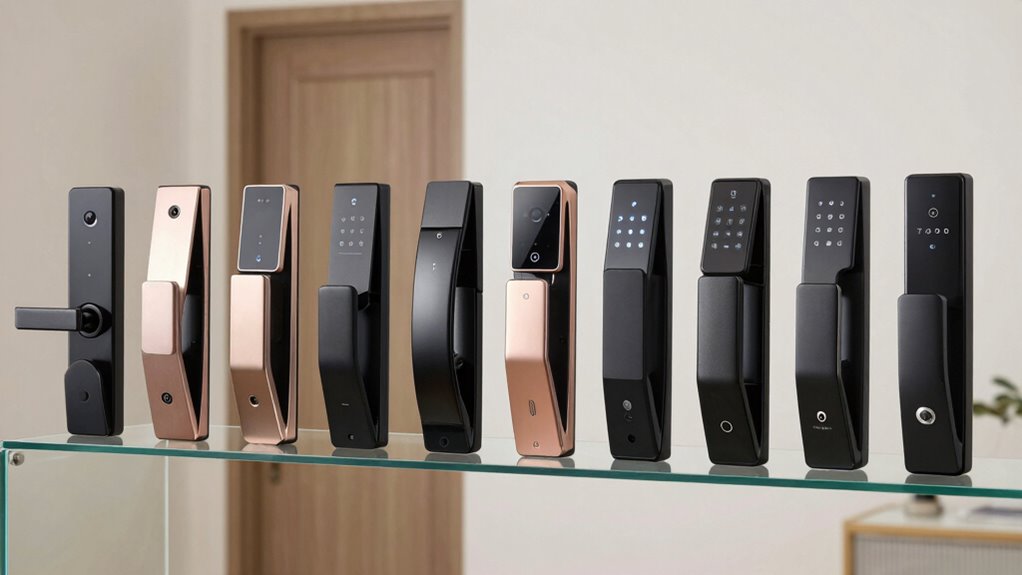

Renters need smart locks that combine flexibility, easy installation, and reliable security without damaging doors or risking lease violations. The Veise VE027-K WiFi Smart Deadbolt stands out as the best overall pick for its straightforward installation and strong app control. The ULTRALOQ Bolt Fingerprint WiFi Lock offers fast biometric access, perfect for quick entry, while the August Silver Wi-Fi Smart Lock provides seamless integration with smart home systems. These options highlight the main tradeoffs: balancing ease of installation, smart features, and compatibility. Keep reading for a detailed breakdown of what makes each of these a good fit for renters.

Get the little things that make your day delivered free — and shop member deals
- Fast, free delivery on millions of items
- Access to Prime Big Deal Days deals on October 6–7
- Prime Video, Amazon Music and more included
Key Takeaways
- The best smart locks for renters prioritize easy, damage-free installation and removal.
- Wi-Fi connectivity consistently offers the most convenience for remote access and control.
- Biometric and keypad options add extra security and quick access, vital for shared or temporary living situations.
- Compatibility with smart home ecosystems varies; choosing a lock that integrates well can simplify daily routines.
- Price and features often trade off—more advanced options tend to be more complex or costly, but offer better convenience and security.
| Veise VE027-K WiFi Smart Deadbolt Lock Set, Matte Black |  | Best Overall for Versatile and Easy-Install Smart Security | Model Number: VE027-K | Recommended Uses: Front door, Bedrooms, Side Doors, Garage, Back door, Hotel, Apartment, Office, Rental | Included Components: 2 Backup Keys, 2 IC Cards, Mounting Plate, Screws, Latch, Strike, User Manual, Installation Manual, WiFi Fingerprint Smart Lock Set | VIEW ON AMAZON | See Our Full Breakdown |
| Veise VE017 Fingerprint Smart Door Lock with App Control, Satin Nickel |  | Best for Tech-Savvy Renters with Multi-User Needs | Material: All-zinc alloy, scratch-resistant | Battery Life: ≥12 months | Power Source: 4 AA batteries (not included) | VIEW ON AMAZON | See Our Full Breakdown |
| ULTRALOQ Bolt Fingerprint WiFi Smart Lock with Door Sensor |  | Best for Seamless Smart Home Integration and Outdoor Use | Apple Home Certified: Yes | Wi-Fi Support: 2.4 GHz only | Fingerprint Storage: 50 fingerprints | VIEW ON AMAZON | See Our Full Breakdown |
| Wyze Lock Bolt v2 Fingerprint Keyless Entry Smart Lock with Wi-Fi and Backup Keys |  | Best for Fast, Reliable, and Weather-Resistant Keyless Entry | Model Number: WLCKB2 | Recommended Uses: Home | Included Components: AA Battery x8, Wyze Lock Bolt v2 | VIEW ON AMAZON | See Our Full Breakdown |
| ULTRALOQ Bolt SE Wi-Fi Smart Lock with Matter Over Thread and App Control |  | Best for Long-Lasting Battery Life and Smart Home Ecosystem Compatibility | Fingerprint Storage: 50 fingerprints | Passcode Storage: 50 passcodes | Connectivity: Wi-Fi (2.4 GHz), Matter over Thread | VIEW ON AMAZON | See Our Full Breakdown |
| Tapo Smart Wi-Fi Deadbolt Door Lock, Keyless Tactile Buttons, DL100 |  | Best Overall for Outdoor Durability and Versatile Access | Dimensions (Outdoor): 5.88 x 2.65 x 2.2 inches | Battery Life: Up to 200 days in Wi-Fi mode, 300 days in Bluetooth mode | Batteries: 4xAA included | VIEW ON AMAZON | See Our Full Breakdown |
| Bluetooth Fingerprint Smart Lock with Handle & Keypad – Fits Most US Doors, DIY Install, Keyless Entry: Code, FOB, Auto-Lock, Alexa & Google Compatible |  | Best for Families and Renters Seeking Multiple Entry Options | Unlock Methods: Fingerprint, keypad, FOB, code, app, physical key | Door Compatibility: Standard US doors (1-3/8″ to 2-1/4″) | Installation: DIY, no drilling needed | VIEW ON AMAZON | See Our Full Breakdown |
| Smart Lock Ultra with Keypad, Fingerprint, App Control, WiFi, Alexa & Google Compatibility |  | Best for Tech-Savvy Renters Wanting Long Battery Life and Customization | Compatibility: Most standard US apartment door locks | Battery Life: 12 months | Unlock Methods: Fingerprint, keypad, app, Alexa, Google, Matter | VIEW ON AMAZON | See Our Full Breakdown |
| August Silver Wi-Fi Smart Keyless Entry Door Lock |  | Best for Seamless Integration with Existing Deadbolts | Compatibility: Most single-cylinder deadbolts | Connectivity: Wi-Fi 802.11 b/g/n | App Compatibility: iOS and Android | VIEW ON AMAZON | See Our Full Breakdown |
| Anona Holo Wi-Fi Smart Lock with Keypad, Keyless Entry Deadbolt Door Lock with App Remote Control, AutoLock & Anomaly Detection |  | Best for Advanced Security and Easy Non-Destructive Installation | Compatibility: Most single-cylinder deadbolts | Installation: Non-destructive, fits most standard deadbolts | Power: 4 AA batteries, lasts 4-6 months | VIEW ON AMAZON | See Our Full Breakdown |
| smart lock for renter | Battery Life |
|---|---|
| Veise VE027-K WiFi Smart Deadb | — |
| Veise VE017 Fingerprint Smart | ≥12 months |
| ULTRALOQ Bolt Fingerprint WiFi | Up to 1 year |
| Wyze Lock Bolt v2 Fingerprint | Up to 8 months |
| ULTRALOQ Bolt SE Wi-Fi Smart L | 18 months |
| Tapo Smart Wi-Fi Deadbolt Door | Up to 200 days in Wi-Fi mode, 300 days in Bluetooth mode |
| Bluetooth Fingerprint Smart Lo | — |
| Smart Lock Ultra with Keypad | 12 months |
| August Silver Wi-Fi Smart Keyl | — |
| Anona Holo Wi-Fi Smart Lock wi | — |
More Details on Our Top Picks
Veise VE027-K WiFi Smart Deadbolt Lock Set, Matte Black
This model stands out for its broad range of entry options, including fingerprint, PIN, card, voice, and remote app control, making it highly adaptable for various renter needs. Compared to the ULTRALOQ Bolt, the VE027-K offers more flexible entry methods out of the box, though it requires a stable Wi-Fi connection and batteries are not included, adding some ongoing maintenance. Its weatherproof IP65 rating and Grade 3 security standards make it suitable for both indoor and outdoor rentals, but setup can be slightly complex for some users. This pick is ideal for renters who want a comprehensive, easy-to-install smart lock that supports multiple access types without wiring.
Pros:- Multiple entry methods including fingerprint, PIN, card, voice, and remote app control
- Easy DIY installation without wiring in just 10-15 minutes
- Weatherproof design suitable for outdoor use
Cons:- Batteries are not included and need frequent replacement (~8 months)
- Requires a stable 2.4GHz Wi-Fi connection for remote features
Best for: Renters who prioritize multi-method access and easy DIY installation for their front or side doors.
Not ideal for: Renters with spotty Wi-Fi or limited technical comfort, as remote setup and app management could be challenging.
- Model Number:VE027-K
- Recommended Uses:Front door, Bedrooms, Side Doors, Garage, Back door, Hotel, Apartment, Office, Rental
- Included Components:2 Backup Keys, 2 IC Cards, Mounting Plate, Screws, Latch, Strike, User Manual, Installation Manual, WiFi Fingerprint Smart Lock Set
- Power Source:8 AA batteries (not included)
- Weatherproof Rating:IP65
- Standards:BHMA/ANSI Grade 3
Our verdict“Best suited for renters seeking a versatile, easy-to-install smart lock with multiple entry options and weather resistance.”
Veise VE017 Fingerprint Smart Door Lock with App Control, Satin Nickel
This lock excels in advanced biometric security, featuring AI learning fingerprint recognition that adapts over time, which surpasses the basic fingerprint storage of the ULTRALOQ Bolt. Unlike the Bolt, the VE017 doesn’t include a door sensor but offers encrypted local storage and activity logs for enhanced security. It supports multiple unlocking methods such as keypad, key fob, and mechanical key, making it flexible for tenants sharing access. Installation is straightforward, requiring no wiring, but a separate G1 Gateway (sold separately) is needed for remote control, adding extra cost. This lock is better suited to renters who want a high-security, smart biometric solution without wiring hassles.
Pros:- Multiple unlocking options including fingerprint, keypad, app, key fob, and mechanical key
- AI learning fingerprint recognition with 0.2-second access and adaptability
- Secure local data storage with AES128 encryption and detailed activity logs
Cons:- Requires purchase of G1 Gateway for remote access, increasing overall cost
- Batteries are not included and may need frequent replacements depending on usage
Best for: Renters in multi-tenant buildings or shared spaces needing secure, customizable access control.
Not ideal for: Renters seeking an all-in-one remote control solution without additional purchases or those uneasy with separate gateway setups.
- Material:All-zinc alloy, scratch-resistant
- Battery Life:≥12 months
- Power Source:4 AA batteries (not included)
- Connectivity:Wi-Fi via G1 Gateway (sold separately), Alexa/Google compatible
- Waterproof Rating:IP55
- Installation:DIY, 15 minutes, no drilling required
Our verdict“Ideal for renters wanting a biometric-focused smart lock with multiple access methods, especially in multi-tenant scenarios.”
ULTRALOQ Bolt Fingerprint WiFi Smart Lock with Door Sensor
This lock makes a strong case for renters who want a straightforward, weather-resistant smart lock that integrates with Apple Home, unlike the ULTRALOQ Bolt SE which emphasizes compatibility with Thread hubs. Its built-in door sensor offers real-time status updates, a feature missing from many competitors like the Wyze Bolt v2. The multiple unlocking methods, including fingerprint and passcodes, are easy to configure, but the reliance on 2.4 GHz Wi-Fi limits flexibility, and battery replacement is needed roughly once a year. It’s a solid choice for outdoor renters or those wanting a reliable, Apple-compatible smart lock that doesn’t require wiring.
Pros:- Supports multiple unlocking methods including fingerprint, passcodes, and voice commands
- Includes a door sensor for real-time monitoring
- Weather-resistant and durable (IP65)
Cons:- Limited to 2.4 GHz Wi-Fi, no 5 GHz support
- Battery replacement required approximately once a year
Best for: Renters seeking a weatherproof, Apple Home-compatible smart lock with real-time door status monitoring.
Not ideal for: Renters who need 5 GHz Wi-Fi support or a more budget-friendly, minimal feature lock.
- Apple Home Certified:Yes
- Wi-Fi Support:2.4 GHz only
- Fingerprint Storage:50 fingerprints
- Passcode Storage:50 codes
- Battery Life:Up to 1 year
- Material:Zinc alloy
Our verdict“Best suited for outdoor renters or those seeking reliable Apple Home integration and real-time door status updates.”
Wyze Lock Bolt v2 Fingerprint Keyless Entry Smart Lock with Wi-Fi and Backup Keys
The Wyze Lock Bolt v2 is distinguished for its ultrafast fingerprint scanner that unlocks in under 0.5 seconds—ideal for renters who value quick access. Compared to the Veise VE017, its AI self-learning feature improves recognition accuracy over time, making it more reliable for frequent use. The weather-resistant IP53 rating and tamper alarms make it suitable for outdoor or high-traffic areas. However, remote management depends on Wi-Fi, and battery life, while up to 8 months, can vary with usage. Setup might pose a challenge for some users unfamiliar with smart devices. This lock is best for renters who need quick, reliable access with long-lasting batteries and weather resilience.
Pros:- Unlocks in under 0.5 seconds with fingerprint scanner
- AI self-learning improves recognition over time
- Weather-resistant with tamper alarms
Cons:- Wi-Fi dependent for remote control functions
- Battery life varies with usage, may need frequent replacements
Best for: Renters wanting a fast, durable, and weatherproof lock with simple, quick access.
Not ideal for: Renters with very limited Wi-Fi or those who prefer a wired or integrated smart home system.
- Model Number:WLCKB2
- Recommended Uses:Home
- Included Components:AA Battery x8, Wyze Lock Bolt v2
- Weather Resistance:IP53
- Durability:BHMA2
- Battery Life:Up to 8 months
Our verdict“Ideal for renters seeking a fast, durable, and weatherproof smart lock with biometric convenience.”
ULTRALOQ Bolt SE Wi-Fi Smart Lock with Matter Over Thread and App Control
This lock is a strong choice for renters who want a long-lasting battery and integration with modern smart home ecosystems. Its 18-month battery life surpasses most competitors like the Wyze Bolt v2, reducing maintenance frequency. The support for Matter over Thread ensures compatibility with future-proof smart home setups, unlike the ULTRALOQ Bolt which relies solely on Wi-Fi. However, remote access requires a compatible Matter hub, adding a layer of complexity and cost. If seamless smart home integration and minimal maintenance are priorities, this lock fits well, but it’s less suitable for renters without a Matter ecosystem or those who prefer straightforward Wi-Fi control without additional hardware.
Pros:- Supports multiple access methods including fingerprint, passcodes, app, and voice
- Long battery life of up to 18 months reduces need for frequent replacements
- Supports Matter over Thread for future-proof smart home integration
Cons:- Requires a compatible Matter hub for remote access
- Wi-Fi connectivity limited to 2.4 GHz
Best for: Renters invested in Matter-enabled smart home systems who want long-term battery life and easy installation.
Not ideal for: Renters without a Matter hub or those needing immediate remote control without extra purchases.
- Fingerprint Storage:50 fingerprints
- Passcode Storage:50 passcodes
- Connectivity:Wi-Fi (2.4 GHz), Matter over Thread
- Battery Life:18 months
- Material:Zinc alloy
- Water Resistance:IP65
Our verdict“Best suited for renters seeking a long-lasting, future-proof smart lock within a Matter-enabled smart home ecosystem.”
Tapo Smart Wi-Fi Deadbolt Door Lock, Keyless Tactile Buttons, DL100
This pick stands out for its multiple unlocking methods—keypad, Bluetooth, Wi-Fi, and voice control—which offers flexibility for renters who may need different access options. Unlike the August Lock, which primarily transforms existing deadbolts, the Tapo DL100 is a standalone unit with weatherproofing, making it suitable for outdoor use. However, its moderate BHMA Grade 3 certification means it’s less durable than premium models, and battery life can require frequent replacements if heavily used. Its weatherproof design and comprehensive features make it ideal for outdoor or exposed doors, but limited to standard lock sizes, which might not fit all doors.
Pros:- Multiple unlocking methods including keypad, Bluetooth, Wi-Fi, and voice commands
- Weatherproof design suitable for outdoor installation
- Easy installation with no drilling required
Cons:- Battery life may require frequent replacements with heavy use
- Moderate durability with BHMA Grade 3 certification
- Limited compatibility with non-standard door sizes
Best for: Renters needing a weatherproof, versatile smart lock with multiple access options, especially for outdoor doors
Not ideal for: Renters with non-standard door sizes or those seeking the highest durability grade, as this lock’s Grade 3 certification may not withstand heavy wear long-term
- Dimensions (Outdoor):5.88 x 2.65 x 2.2 inches
- Battery Life:Up to 200 days in Wi-Fi mode, 300 days in Bluetooth mode
- Batteries:4xAA included
- Weatherproof Rating:IP54
- Certification:BHMA Grade 3
- Temperature Range:-22°F to 158°F
Our verdict“This is a solid outdoor-ready smart lock for renters who want flexible access and weather resistance without complex installation.”
Bluetooth Fingerprint Smart Lock with Handle & Keypad – Fits Most US Doors, DIY Install, Keyless Entry: Code, FOB, Auto-Lock, Alexa & Google Compatible
This model excels at offering a variety of access methods—fingerprint, keypad, FOB, app, and physical key—which makes it highly adaptable for different household members, guests, or temporary renters. Compared to the August Lock, which relies on your existing deadbolt, this lock is a fully integrated solution, ideal for those who prefer a new handle and lockset. Its DIY installation is straightforward, but it requires a gateway for voice control with Alexa or Google, which adds complexity and cost. Battery life isn’t specified, so heavy use could lead to more frequent replacements, and compatibility might be limited with non-standard doors.
Pros:- Multiple unlock options including fingerprint, keypad, FOB, and app
- Easy DIY installation without drilling
- Compatible with Alexa and Google Assistant for voice control
Cons:- Requires a gateway for voice assistant compatibility
- Battery life not specified, potential for frequent replacements
- Potential compatibility issues with non-standard doors
Best for: Renters and families who want multiple secure entry options with easy installation and smart home integration
Not ideal for: Renters with non-standard door sizes or those who prefer a simple, single-method lock without extra components like gateways
- Unlock Methods:Fingerprint, keypad, FOB, code, app, physical key
- Door Compatibility:Standard US doors (1-3/8″ to 2-1/4″)
- Installation:DIY, no drilling needed
- Connectivity:Bluetooth, Wi-Fi (with gateway)
- Compatibility:Alexa and Google Assistant
Our verdict“Ideal for renters wanting flexible, multi-method access with simple DIY setup and smart home compatibility.”
Smart Lock Ultra with Keypad, Fingerprint, App Control, WiFi, Alexa & Google Compatibility
This pick offers a comprehensive suite of unlocking options—fingerprint, keypad, app control—and supports Apple HomeKit via the SwitchBot Hub mini, making it highly flexible for tech enthusiasts. Its 12-month battery life surpasses many competitors, reducing the hassle of frequent replacements. The 6-layer security system and magnetic automatic locking provide peace of mind, but it isn’t compatible with European locksets and requires the Hub mini for full smart features, adding complexity. Support for Jimmy Proof and Mortise locks may need extra accessories, which could be a downside for some renters seeking simplicity.
Pros:- Multiple secure unlocking methods including fingerprint and keypad
- Long battery life of up to 12 months
- Supports Apple HomeKit, Alexa, and Google for diverse smart home setups
- Customizable appearance with wood grain stickers
Cons:- Requires SwitchBot Hub mini for full smart features
- Not compatible with European locksets without additional accessories
- Support for certain lock types may need extra parts
Best for: Renters who value long battery life, high security, and seamless smart home integration with multiple platforms
Not ideal for: Renters with European locksets or those seeking a straightforward, all-in-one smart lock without additional accessories
- Compatibility:Most standard US apartment door locks
- Battery Life:12 months
- Unlock Methods:Fingerprint, keypad, app, Alexa, Google, Matter
- Security Features:6-layer security, magnetic automatic locking
- Included Accessories:Wood grain stickers
Our verdict“Best suited for renters seeking a long-lasting, highly secure smart lock with extensive smart home compatibility and customization options.”
August Silver Wi-Fi Smart Keyless Entry Door Lock
This lock transforms your existing deadbolt into a smart device, making it a popular choice for renters who want a discreet upgrade. Its quick installation—around 10 minutes—offers a simple way to add keyless entry, auto-lock, and remote sharing. Compared to the other models, such as the Ultra or Holo, it relies on your existing lock, which might limit security features and durability. It integrates smoothly with Alexa, Google, and Apple, but requires a stable Wi-Fi connection and a smartphone app, which can be challenging for less tech-savvy renters. The optional keypad and biometric features are sold separately, adding extra cost.
Pros:- Easy to install in about 10 minutes
- Supports remote access and keyless entry
- Works with Alexa, Google, and Apple
Cons:- Requires Wi-Fi and smartphone app, which can be complex for some users
- Biometric and keypad features are sold separately
- Setup and app configuration may be challenging
Best for: Renters wanting an easy, non-invasive upgrade to their existing deadbolt with remote access capabilities
Not ideal for: Renters with non-standard deadbolts or those needing a fully independent lock system
- Compatibility:Most single-cylinder deadbolts
- Connectivity:Wi-Fi 802.11 b/g/n
- App Compatibility:iOS and Android
- Installation Time:Approximately 10 minutes
- Additional Features:Auto-Unlock, Auto-Lock, DoorSense
Our verdict“Best suited for renters looking for a simple, fast upgrade to their existing deadbolt with remote access capabilities.”
Anona Holo Wi-Fi Smart Lock with Keypad, Keyless Entry Deadbolt Door Lock with App Remote Control, AutoLock & Anomaly Detection
This lock offers a compelling mix of features—auto-lock, anomaly detection, and remote control—making it ideal for renters who prioritize security and convenient installation. Its non-destructive design means it can fit most standard single-cylinder deadbolts without altering existing hardware, unlike some models requiring more invasive setup. The auto-lock and anomaly detection add layers of security beyond simple access, but its battery life of 4-6 months means more frequent replacements than some competitors, and remote features depend on Wi-Fi stability. Support for both Alexa and Apple HomeKit broadens compatibility for smart home integration.
Pros:- Easy, non-destructive installation fits most standard deadbolts
- Supports voice control via Alexa and Apple HomeKit
- Includes auto-lock and anomaly detection for enhanced security
Cons:- Battery life of 4-6 months may require frequent replacements
- Wi-Fi dependence can complicate remote access
- Limited to single-cylinder deadbolts
Best for: Renters who want a secure, easy-to-install smart lock with advanced security features and minimal hardware changes
Not ideal for: Renters seeking a long-term battery solution or those with European locksets needing additional adapters
- Compatibility:Most single-cylinder deadbolts
- Installation:Non-destructive, fits most standard deadbolts
- Power:4 AA batteries, lasts 4-6 months
- Features:AutoLock, anomaly detection, remote control
- Voice Support:Alexa, Apple HomeKit
Our verdict“Ideal for renters wanting a quick, non-invasive upgrade with advanced security features and smart home compatibility.”

How We Picked
To determine the best smart locks for renters, I evaluated factors such as ease of installation, whether the lock damages the door or can be removed without leaving marks, and the quality of remote control features. Security was also a priority, including biometric, keypad, and app-based options. Compatibility with popular smart home platforms and the overall value for renters who need flexible, temporary solutions influenced the rankings. Products were compared based on user reviews, feature sets, and how well they suited renters’ need for quick, non-permanent installation and removal. This approach ensures that each pick addresses the unique challenges renters face with smart lock choices.Factors to Consider When Choosing Smart Lock For Renters
Choosing a smart lock as a renter involves balancing convenience, security, and the ability to install or remove the device without damaging the door. Every renter’s situation is different—whether you’re in a temporary apartment or a lease with strict rules—so understanding key factors can help you pick the right model. The following sections highlight the most important considerations to keep in mind to avoid common pitfalls and ensure your smart lock fits your lifestyle.Installation and Damage-Free Removal
For renters, the primary concern is installing a lock that doesn’t require drilling or permanent modifications. Many locks are designed to fit standard doors without damaging the surface, but some models still leave marks or require tools that could affect your security deposit. Always check if the lock is compatible with your door type and whether it can be easily removed without traces, especially if you’re moving frequently. Opt for models with adjustable clamps or those that attach using existing hardware to avoid damage.
Remote Access and Connectivity
Wi-Fi-enabled locks provide the convenience of remote control, letting you grant access or check status from anywhere. However, this usually requires a stable internet connection and can introduce security concerns if not properly protected. Bluetooth-only locks are simpler but limit control to close proximity. Consider your routine—if you often hand over keys or need to unlock remotely, prioritizing Wi-Fi connectivity makes sense, but always ensure that security protocols are robust to avoid hacking risks.
Security Features and Access Options
Multiple access methods—keypad, fingerprint, app control—offer flexibility but also come with different security implications. Keypads are straightforward but can be guessed or observed, while biometric options provide faster access with less risk of lost keys. Combining several methods can boost security, but also adds complexity and cost. Think about who needs access and how often—if you share your home or want quick entry, biometric or keypad options are practical, but for occasional use, app control might suffice.
Smart Home Compatibility
Many renters now want their smart lock to work seamlessly with existing smart home devices like Alexa, Google Assistant, or Apple HomeKit. Compatibility simplifies automation and voice control, but not all locks support every ecosystem. Verify compatibility before buying, especially if you already use a specific platform. Missing this feature can limit convenience, requiring manual control or additional hubs, which might complicate your setup or add extra costs.
Price and Budget Considerations
While high-end smart locks offer more advanced features, they often come with a higher price tag. For renters, it’s wise to balance affordability with essential features like easy installation, remote access, and security. Cheaper models may lack certain functionalities or be less durable, but they can still provide excellent value if they meet your needs. Avoid overspending on features you won’t utilize, but also be cautious about extremely cheap options that might compromise security or reliability.
Frequently Asked Questions
Can I install a smart lock on my rented apartment door without damaging it?
Yes, many smart locks are designed specifically for renters with installation methods that do not require drilling or permanent modifications. These include locks that clamp onto the door or attach using existing hardware, making them removable without leaving marks. Always verify the installation method and check whether the lock is compatible with your door type before purchasing. This approach ensures you can enjoy smart lock features without risking your security deposit.
Will a smart lock work if I lose Wi-Fi or my internet connection?
Most Wi-Fi-enabled smart locks can still be operated locally via Bluetooth or keypad, depending on the model. However, remote control features and app notifications will typically require an active internet connection. If your Wi-Fi goes down, you may lose remote management capabilities but should still be able to unlock the door manually or through local methods. Consider models with backup options, such as keypad codes or physical keys, to avoid getting locked out during connectivity issues.
Are biometric smart locks secure enough for rental properties?
Biometric locks, such as fingerprint models, generally provide a high level of security because they rely on unique biological traits. They reduce the risk of lost keys or code sharing, which is especially helpful in shared rentals. Nonetheless, no system is entirely foolproof—biometric sensors can occasionally malfunction or be fooled by high-quality copies. Combining biometric access with other methods like PIN codes or app controls can enhance overall security for rental situations.
How long does it take to install a smart lock suitable for renters?
Most renter-friendly smart locks can be installed in under 30 minutes, often without any tools or with minimal adjustments. The process typically involves attaching the lock to your door using clamps or existing hardware, pairing it with your smartphone, and setting up access codes or biometric data. This quick setup makes it ideal for renters who frequently move or want to avoid long installation times. Always follow the manufacturer’s instructions carefully to ensure proper fit and security.
Can I use a smart lock if I don’t have a Wi-Fi network at home?
Yes, several smart locks operate via Bluetooth or keypad entry without requiring Wi-Fi. These models are often simpler and more secure against hacking since they lack internet connectivity. However, they limit remote access and control, which might be inconvenient if you want to manage your lock from afar. If remote control is important, consider a model with both Bluetooth and Wi-Fi, or ensure you have reliable internet access at your rental.
Conclusion
For renters seeking the best overall balance of ease of installation, security, and smart features, the Veise VE027-K WiFi Smart Deadbolt makes a compelling choice. Those prioritizing quick biometric access might favor the ULTRALOQ Bolt Fingerprint WiFi Lock. Budget-conscious renters will find good value in models like the Tapo Smart Wi-Fi Deadbolt. For seamless smart home integration, the August Silver Wi-Fi Lock offers excellent compatibility. Ultimately, your choice depends on your specific rental situation, desired features, and budget—consider these factors carefully to find the perfect fit.NFL season / tailgating Picks
team gear
As an affiliate, we earn on qualifying purchases.