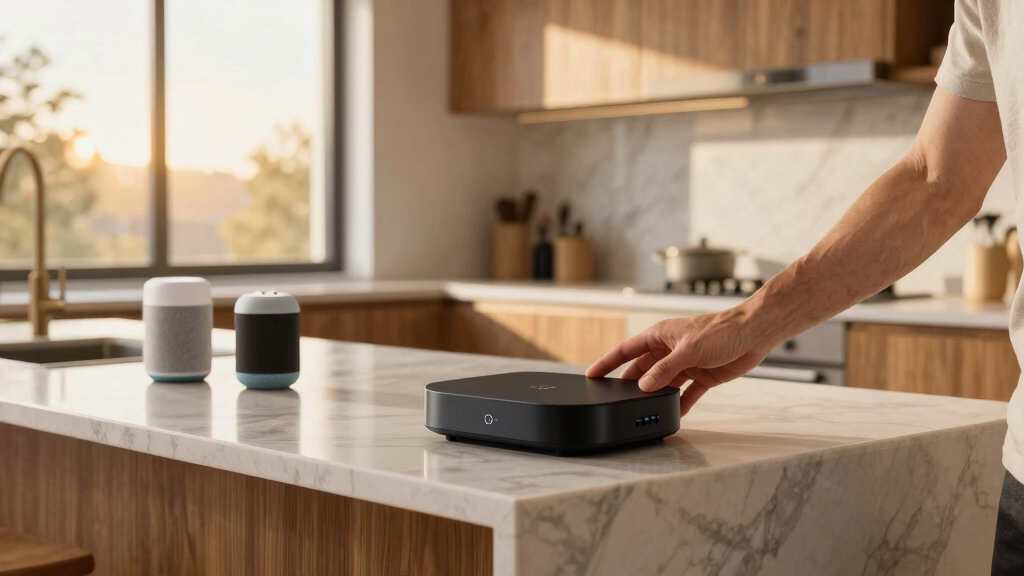

Finding the best home automation hub for Alexa and Google can be challenging given the variety of options and compatibility issues. The Amazon Echo Hub stands out as the overall top pick thanks to its extensive Alexa integration and user-friendly interface. For those prioritizing Zigbee support, the MOES Smart Home Control Panel offers built-in Alexa and Zigbee compatibility. Meanwhile, the Hubitat Elevation C-8 Pro excels for advanced users seeking broader protocol support like Z-Wave, Zigbee, and Matter. Buyers often face tradeoffs between ease of setup, protocol support, and price—this guide helps clarify which hub suits your specific needs. Continue reading for a detailed comparison of the top options.

Get the little things that make your day delivered free with Prime
- Fast, free delivery on millions of items
- Prime Video, Amazon Music and more included
- Member-only deals all year
Key Takeaways
- The best hubs balance seamless voice assistant compatibility with protocol support like Zigbee and Z-Wave.
- More advanced users benefit from hubs supporting multiple protocols and custom automations, like Hubitat Elevation.
- Built-in voice assistants (Alexa or Google) simplify setup, but may limit customization options compared to standalone hubs.
- Price varies significantly; the most feature-rich hubs tend to cost more, but offer better integration and future-proofing.
- Choosing a hub with broad compatibility reduces frustration and expands your smart home ecosystem over time.
| Go Smart Bridge Home Automation Hub for Motorized Blinds Compatible with Alexa, Google Home, IFTTT, Control4, Siri |  | Best for Motorized Blinds and Shades Integration | Compatibility: Many motor brands (Neo, Bofu, Simplicity, etc.) | Range: Approximately 150ft | Control: Remote, App, Voice | VIEW LATEST PRICE | See Our Full Breakdown |
| Amazon Echo Hub (newest model), 8″ Smart Home Control Panel with Alexa+ |  | Best Overall Smart Home Control Panel | Display Size: 8 inches | Compatibility: Alexa, Ring, Zigbee, Matter, Sidewalk, Thread | Connectivity: WiFi, Bluetooth | VIEW LATEST PRICE | See Our Full Breakdown |
| MOES Smart Home Control Panel with Alexa Built-in, Zigbee Hub |  | Best for Wide Device Compatibility with Zigbee | Compatibility: Smart Life devices including switches, bulbs, sockets, cameras, door locks | Display: 5-inch full touch screen | Voice Assistant: Alexa built-in | VIEW LATEST PRICE | See Our Full Breakdown |
| Tapo Smart Hub with Built-in Chime, H200, 2.4GHz Wi-Fi Required | 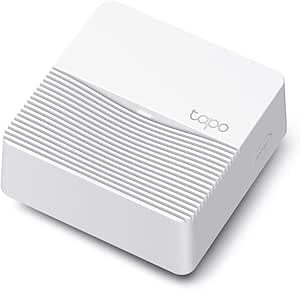 | Best for Large Device Ecosystems and Local Storage | Device Capacity: 64 switches, sensors, or buttons + 4 cameras or doorbells | Wi-Fi Frequency: 2.4GHz | MicroSD Storage: Up to 512 GB | VIEW LATEST PRICE | See Our Full Breakdown |
| Linkind Matter Smart Plug, Works with Apple Home, Alexa, Siri, Google Home | 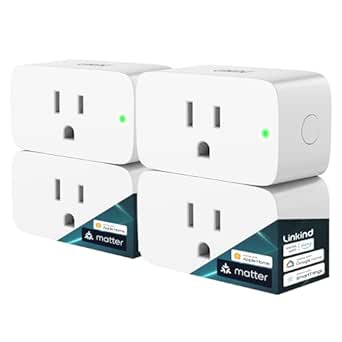 | Best for Cross-Platform Smart Plug Control | Connector Type: Plug in | Number of Poles: 1 | Power Capacity: 1800W | VIEW LATEST PRICE | See Our Full Breakdown |
| GHome WiFi Smart Plug – Compatible with Alexa and Google Assistant | 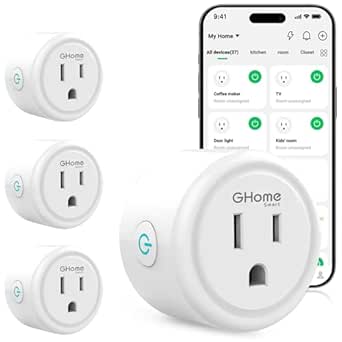 | Best for Simple Voice-Enabled Device Control | Operation Mode: ON-OFF-ON | Current Rating: 10 A | Operating Voltage: 120 volts | VIEW LATEST PRICE | See Our Full Breakdown |
| Hubitat Elevation C-8 Pro Smart Home Hub – Z-Wave, Zigbee, Matter |  | Best for Privacy-Focused, Multi-Protocol Smart Homes | Protocols: Matter 1.5, Z-Wave 800 Series Long Range, Zigbee 3.0, Bluetooth | External Antennas: 2 | Dimensions: 3.23 x 2.95 x 0.67 inches | VIEW LATEST PRICE | See Our Full Breakdown |
| home automation hub for alexa and google | Compatibility |
|---|---|
| Go Smart Bridge Home Automatio | Many motor brands (Neo, Bofu, Simplicity, etc.) |
| Amazon Echo Hub | Alexa, Ring, Zigbee, Matter, Sidewalk, Thread |
| MOES Smart Home Control Panel | Smart Life devices including switches, bulbs, sockets, cameras, door locks |
| Tapo Smart Hub with Built-in C | Tapo C420, Tapo C400, Tapo D230, and more |
| Linkind Matter Smart Plug | — |
| GHome WiFi Smart Plug | — |
| Hubitat Elevation C-8 Pro Smar | Alexa, Google Home, Apple HomeKit |
More Details on Our Top Picks
Go Smart Bridge Home Automation Hub for Motorized Blinds Compatible with Alexa, Google Home, IFTTT, Control4, Siri
The Go Smart Bridge stands out for its specialized focus on motorized blinds, making it ideal for those who want automated window treatments integrated with their broader smart home ecosystem. Unlike the Amazon Echo Hub, which excels at centralized control of various devices on a visual dashboard, this hub emphasizes seamless scheduling and scene creation specifically for blinds and shades. Its compatibility with multiple motor brands and integration with Alexa, Google, and Siri Shortcuts offers flexible voice control, though it doesn’t support Apple Home Kit directly. The limited 150ft range and need for a separate controller per floor can be challenges in larger homes. This pick makes the most sense for homeowners seeking dedicated blinds automation without the need for a full smart home control panel.
Pros:- Supports multiple smart home platforms including Alexa, Google, Siri Shortcuts, IFTTT, and Control4
- Allows scheduling and scene creation for automated blinds control
- Mobile app provides easy control and customization
Cons:- Not compatible with wand motors or Apple Home Kit
- Range limited to approximately 150ft
- One controller recommended per floor for optimal coverage
Best for: Homeowners with motorized blinds needing detailed scheduling and multi-platform voice control
Not ideal for: Those wanting a general smart home hub with broad device control or Apple Home Kit integration
- Compatibility:Many motor brands (Neo, Bofu, Simplicity, etc.)
- Range:Approximately 150ft
- Control:Remote, App, Voice
- Not Compatible With:Wand motors, Apple Home Kit
Our verdict“This hub suits those specifically aiming to automate motorized blinds with multi-platform voice support, accepting some range limitations.”
Amazon Echo Hub (newest model), 8″ Smart Home Control Panel with Alexa+
The Amazon Echo Hub makes a strong case as the best overall control panel for a smart home, thanks to its large 8-inch display and intuitive interface, which surpasses the more niche focus of the Go Smart Bridge. While the Go Smart Bridge excels at blinds automation, the Echo Hub offers a centralized visual dashboard that manages security cameras, routines, and device groups effortlessly. Its seamless integration with Alexa, Zigbee, Thread, and Matter means it can control a wide variety of devices, making it more versatile overall. However, it requires separate purchases for wall mounts and Ethernet adapters, which could complicate setup. This device is best for users seeking a comprehensive, all-in-one control point with strong privacy features, even if it isn’t specialized for blinds or shades automation.
Pros:- Customizable dashboard for personalized control
- Seamless integration with thousands of smart devices
- Built-in privacy controls and mic off button
- Eco-friendly materials and packaging
Cons:- Requires separate purchase for wall mounts and Ethernet adapter
- Dependent on Ring subscription for full security features
Best for: Families or tech enthusiasts wanting a centralized, visual control panel across numerous smart devices
Not ideal for: Homeowners seeking a dedicated blinds automator or minimalist setup with limited device control
- Display Size:8 inches
- Compatibility:Alexa, Ring, Zigbee, Matter, Sidewalk, Thread
- Connectivity:WiFi, Bluetooth
- Materials:27% recycled materials
Our verdict“Ideal for users who want a large, versatile control panel that ties together most smart home devices in one place.”
MOES Smart Home Control Panel with Alexa Built-in, Zigbee Hub
The MOES Smart Home Control Panel targets those who want a hands-free voice experience combined with Zigbee hub capabilities, offering a compact 5-inch touchscreen. Compared to the larger Amazon Echo Hub, it’s more suited for users who prefer a dedicated control panel with Zigbee integration, reducing the need for multiple hubs. Its compatibility with a wide range of Smart Life devices and built-in Alexa support makes it versatile, but it’s limited to Zigbee and Smart Life-compatible devices, which might restrict future expansion. Easy to install with wired and wireless options, this model is perfect for those who want a streamlined, voice-enabled interface for their Zigbee ecosystem but don’t need a large display or extensive device management.
Pros:- Wide compatibility with Smart Life devices
- Built-in Alexa for hands-free voice control
- Integrated Zigbee hub eliminates extra hardware
- Easy to install with multiple connection options
Cons:- Limited to Zigbee and Smart Life device ecosystems
- Requires setup and configuration for optimal use
Best for: Users with existing Zigbee-compatible devices seeking a dedicated, compact control panel with Alexa
Not ideal for: Homeowners who prefer larger screens or need broad device compatibility beyond Zigbee and Smart Life
- Compatibility:Smart Life devices including switches, bulbs, sockets, cameras, door locks
- Display:5-inch full touch screen
- Voice Assistant:Alexa built-in
- Connectivity:Wired and wireless network support
Our verdict“Best for Zigbee users wanting a dedicated, voice-enabled control panel without the bulk of larger displays.”
Tapo Smart Hub with Built-in Chime, H200, 2.4GHz Wi-Fi Required
The Tapo H200 offers a robust solution for those wanting to connect up to 64 devices, including sensors, switches, and cameras, making it a strong contender for comprehensive smart home setups. Its built-in chime and support for local microSD storage provide added security and convenience, especially over the Linkind Smart Plug which focuses more on simple device control. While the H200’s reliance on 2.4GHz Wi-Fi and the need for separate microSD purchase can be drawbacks, its ability to handle a large number of devices makes it suitable for complex households. This hub is best for users who want a scalable, local-control-centric system that integrates voice commands via Alexa and Google, even if it’s limited to Tapo-compatible devices.
Pros:- Supports a large number of connected devices
- Works with popular voice assistants for automation
- Provides local microSD storage for recordings
- Supports long-lasting low-power wireless operation
Cons:- Requires 2.4GHz Wi-Fi network, not compatible with 5GHz
- MicroSD card sold separately, adding cost
- Limited to Tapo compatible devices
Best for: Homeowners with extensive device ecosystems seeking local storage and multi-device control
Not ideal for: Those with primarily 5GHz networks or seeking simple plug-in automation
- Device Capacity:64 switches, sensors, or buttons + 4 cameras or doorbells
- Wi-Fi Frequency:2.4GHz
- MicroSD Storage:Up to 512 GB
- Compatibility:Tapo C420, Tapo C400, Tapo D230, and more
Our verdict“Best for users needing a scalable, local storage-enabled hub for a large smart device network.”
Linkind Matter Smart Plug, Works with Apple Home, Alexa, Siri, Google Home
The Linkind Matter Smart Plug offers versatile, plug-in control across Apple, Alexa, and Google platforms, making it ideal for simple automation tasks. Compared with the Go Smart Bridge, which is specialized for blinds, this plug focuses on easy control of devices like lamps and small appliances. Its support for Matter protocol ensures smooth cross-platform operation and offline LAN control, but it’s limited to 2.4GHz Wi-Fi and only supports Type A plugs, which could restrict usage in some regions or setups. This device makes the most sense for users needing straightforward, reliable plug control that works seamlessly across multiple voice assistants and smart home ecosystems.
Pros:- Supports multiple voice assistants including Alexa, Siri, and Google Home
- Offline LAN communication for control during internet outages
- Easy setup with Matter protocol for interoperability
- Compact, safety-certified design
Cons:- Limited to 2.4GHz Wi-Fi networks
- Supports only Type A plugs
Best for: Users seeking a simple, cross-platform smart plug for automating small appliances
Not ideal for: Homeowners looking for advanced device hubs or dedicated blinds automation
- Connector Type:Plug in
- Number of Poles:1
- Power Capacity:1800W
- Wi-Fi Support:2.4GHz only
Our verdict“Ideal for those needing reliable, cross-platform control of small devices with simple setup and offline control features.”
GHome WiFi Smart Plug – Compatible with Alexa and Google Assistant
The GHome WiFi Smart Plug stands out for its straightforward integration with both Alexa and Google Assistant, making it a solid choice for those seeking easy voice control of individual devices. Compared with the Hubitat Elevation C-8 Pro, it offers a much simpler setup and is ideal for users who don’t need extensive automation or multi-protocol support. However, its reliance on 2.4GHz WiFi limits flexibility in some modern networks, and it’s designed solely for indoor use, which could be a drawback for outdoor applications. Remote app control and timers add convenience, but it requires initial setup through the app before voice commands work, which might be inconvenient for some. Overall, this plug makes the most sense for homeowners who want quick, reliable control over a few devices without complex configurations.
Pros:- Supports voice control with Alexa and Google Assistant
- Remote control via app from anywhere
- Easy scheduling and timer functions
Cons:- Limited to 2.4GHz WiFi networks, reducing flexibility
- Requires app setup before voice control is functional
Best for: Homeowners who want easy, reliable voice control for individual appliances without the complexity of a full smart home system
Not ideal for: Users seeking a multi-device hub with advanced automation features or outdoor compatibility
- Operation Mode:ON-OFF-ON
- Current Rating:10 A
- Operating Voltage:120 volts
- Contact Type:Normally Open
- Control Method:App, Remote, Touch, Voice
- Connectivity Protocol:Wi-Fi
- Wattage:1200 watts
- Compatible Devices:Alexa, Google Home
Our verdict“This plug is perfect for those who want simple voice control of individual devices without additional automation complexity.”
Hubitat Elevation C-8 Pro Smart Home Hub – Z-Wave, Zigbee, Matter
The Hubitat Elevation C-8 Pro excels in offering a privacy-centric approach with local processing for faster response times, making it ideal for more complex smart home setups. Unlike the GHome Smart Plug, which focuses on individual device control, this hub supports multiple protocols—Z-Wave, Zigbee, and Matter—providing a broad range of device compatibility and extended wireless range. Its local automation processing ensures actions happen immediately, without reliance on cloud services, which is a key advantage over cloud-dependent hubs like the Amazon Echo Hub. The setup can be more challenging for beginners, especially without a built-in display, but it rewards users with reliable, subscription-free operation. This pick is perfect for those who want to build a robust, multi-protocol system with strong privacy protections.
Pros:- Supports multiple protocols with extended range
- Local processing ensures fast, reliable automation
- Compatible with Alexa, Google Home, and Apple HomeKit
- No subscription required for full functionality
Cons:- Setup can be complex without prior networking experience
- No built-in display or user interface for local control
- Limited to existing device compatibility—adding new devices may need updates
Best for: Tech-savvy homeowners seeking a flexible, local-control hub capable of managing a wide array of protocols and devices
Not ideal for: Beginners or users who prefer plug-and-play solutions with simple setup and minimal configuration
- Protocols:Matter 1.5, Z-Wave 800 Series Long Range, Zigbee 3.0, Bluetooth
- External Antennas:2
- Dimensions:3.23 x 2.95 x 0.67 inches
- Compatibility:Alexa, Google Home, Apple HomeKit
- Subscription:None required
- Weight:0.16 lbs
Our verdict“This hub works best for homeowners who want a flexible, privacy-focused hub capable of handling a diverse array of smart devices and protocols, despite a steeper setup curve.”

How We Picked
These products were evaluated based on their compatibility with both Alexa and Google Assistant, ease of setup, build quality, protocol support (Zigbee, Z-Wave, Matter), and user interface. We prioritized hubs that offer reliable voice control integration, good app ecosystems, and future-proof features like Matter support. Devices with broader protocol support tend to appeal to more advanced users, while simpler models suit beginners. The ranking reflects a balance between performance, versatility, value, and ease of use—products that excel in multiple areas received higher placement.| home automation hub for alexa and google | Compatibility |
|---|---|
| Go Smart Bridge Home Automatio | Many motor brands (Neo, Bofu, Simplicity, etc.) |
| Amazon Echo Hub | Alexa, Ring, Zigbee, Matter, Sidewalk, Thread |
| MOES Smart Home Control Panel | Smart Life devices including switches, bulbs, sockets, cameras, door locks |
| Tapo Smart Hub with Built-in C | Tapo C420, Tapo C400, Tapo D230, and more |
| Linkind Matter Smart Plug | — |
| GHome WiFi Smart Plug | — |
| Hubitat Elevation C-8 Pro Smar | Alexa, Google Home, Apple HomeKit |
Factors to Consider When Choosing Best Home Automation Hub For Alexa And Google
Choosing the best home automation hub for Alexa and Google requires understanding several key factors. The right hub should seamlessly integrate with your existing devices, support your preferred protocols, and fit your level of technical comfort. Consider your current smart home setup and future expansion plans to avoid costly mismatches. Beyond features, reliability and ease of use are vital for a satisfying experience. This section breaks down the most important considerations to help you make an informed decision.Compatibility with Voice Assistants
Ensure the hub supports both Alexa and Google Assistant if you want voice control for all devices. Some hubs prioritize one ecosystem over the other, which can limit flexibility. Look for multi-assistant support to get the most out of your smart home setup, especially if you plan to add devices from different brands or ecosystems later. Compatibility isn’t just about voice control—verify app integration and routines work smoothly across platforms.
Protocol Support and Ecosystem Compatibility
The hub’s protocol support determines which devices it can control directly. Zigbee, Z-Wave, and Matter are the most common. For a broad and future-proof setup, choose a hub supporting multiple protocols, like the Hubitat Elevation. Avoid hubs with limited protocol support if you want to integrate a wide range of smart devices, as this can lead to compatibility headaches and the need for additional bridges or hubs.
Ease of Setup and User Interface
Ease of setup varies widely. Some hubs feature intuitive apps and plug-and-play installation, ideal for beginners. More advanced hubs might require configuring network settings and automations manually, which appeals to tech-savvy users but can be daunting for newcomers. Consider your comfort level with technology and whether a straightforward setup outweighs advanced customization options.
Future-Proofing and Protocol Updates
Smart home technology evolves rapidly. Hubs supporting emerging standards like Matter ensure compatibility with future devices, reducing the need for replacements. Investing in a hub with ongoing firmware updates and support can extend its lifespan and expand your ecosystem over time. Missing out on future standards may limit device compatibility and frustrate expansion efforts.
Price and Value
Budget constraints influence your choice, but it’s worth considering long-term value. Cheaper hubs might lack protocol support or advanced features but can suffice for basic setups. Premium models offer broader device compatibility, automation capabilities, and better build quality, which can justify higher costs if you plan to expand or automate extensively. Balance your current needs with potential future requirements to avoid overspending or underbuying.
Frequently Asked Questions
Can I use these hubs if I only have Google Assistant devices?
Most of these hubs support both Alexa and Google Assistant, but it’s essential to verify each model’s compatibility. If your setup is primarily Google Assistant, choosing a hub with native Google support ensures smoother integration. Some hubs prioritize Alexa and may have limited Google features, so double-check the specifications to match your preferred voice assistant ecosystem.
Do I need a dedicated hub if I already have smart devices with Wi-Fi?
Wi-Fi-only devices often don’t require a hub, but a dedicated home automation hub can centralize control, improve reliability, and support protocols like Zigbee or Z-Wave for devices that don’t connect over Wi-Fi. If you have a large or complex ecosystem, a hub can reduce network congestion and simplify automation management, especially for smart devices that rely on protocols other than Wi-Fi.
Will a more expensive hub guarantee better performance?
Not necessarily. While higher-priced hubs often support additional protocols, have better build quality, and offer more automation options, the best choice depends on your specific needs. For simple setups, a lower-cost hub might suffice. For extensive and future-proof ecosystems, investing in a more capable hub can provide better reliability and expansion potential.
How important is protocol support for smart home expansion?
Protocol support is critical if you plan to add a wide range of devices over time. Protocols like Zigbee, Z-Wave, and Matter enable direct device control and reduce dependence on Wi-Fi, which can become congested. A hub supporting multiple protocols allows greater flexibility, compatibility, and easier integration of new gadgets as your smart home evolves.
Should I prioritize built-in voice assistants or separate hubs?
Built-in voice assistants simplify setup and reduce clutter, making them ideal for users seeking convenience. However, dedicated hubs often offer more advanced automation, broader protocol support, and customization options. Consider your automation complexity and comfort with technology—if you want simple voice control, a hub with integrated assistants makes sense; for more advanced automations, a standalone hub might be better.
Conclusion
The best overall choice for most users remains the Amazon Echo Hub, thanks to its balance of ease of use, Alexa support, and future-proof features. If you seek maximum protocol support and customization, the Hubitat Elevation C-8 Pro is ideal, especially for tech-savvy homeowners. For those new to smart home automation, a straightforward, integrated solution like the MOES Smart Home Control Panel offers simplicity without sacrificing compatibility. Budget-conscious buyers should consider options like the GHome WiFi Smart Plug, which provides essential features at a lower price point, though with limited automation depth. Your choice ultimately depends on your current setup, desired automation complexity, and future expansion plans.