To improve your back support, adjust the lumbar support knob first so it fits snugly into your lower back—this helps maintain proper spinal alignment. Next, set the seat height and depth to ensure your feet rest flat on the floor and your knees stay at a 90° angle, promoting comfort and stability. Finally, personalize the armrests and tension to reduce strain and support your shoulders. Keep tweaking these controls for the best fit, and you’ll discover even more ways to optimize your comfort.

Get the little things that make your day delivered free — and shop member deals
- Fast, free delivery on millions of items
- Access to Prime Big Deal Days deals on October 6–7
- Prime Video, Amazon Music and more included
Key Takeaways
- Adjust the lumbar support knob to align the curve with your lower back for optimal spinal support.
- Set the seat height and depth knobs to ensure feet are flat and knees are at a 90° angle.
- Tune the tension or tilt resistance knob to match your weight and preferred recline for comfort.
- Regularly revisit these adjustments to maintain proper posture and prevent long-term discomfort.
- Properly configured knobs promote better ergonomic alignment, reducing strain and fatigue during extended sitting.
ergonomic office chair with adjustable lumbar support
As an affiliate, we earn on qualifying purchases.
As an affiliate, we earn on qualifying purchases.
Adjust Lumbar Support for Proper Spinal Alignment

To guarantee your spine stays healthy and comfortable throughout the workday, adjusting the lumbar support on your office chair is essential. Proper lumbar padding helps maintain your natural spinal curvature, preventing slouching and reducing strain. When you adjust the lumbar support, it should fit snugly into the small of your back, supporting the inward curve of your lower spine. If it’s too high or too low, it can cause discomfort or misalignment, leading to long-term issues. Keep in mind that the goal is to promote a neutral spine position, where your back is supported without forcing any unnatural curves. Regularly adjusting the lumbar support encourages proper posture and ensures your spinal curvature stays aligned, reducing fatigue and improving overall comfort during extended periods of sitting. Additionally, well-adjusted lumbar support can prevent common back pains, contributing to better overall health and productivity. Proper ergonomic support can also promote long-term spinal health, making it a key factor in preventing chronic back problems. Adjusting the lumbar support to match your individual needs can further enhance spinal health and sitting comfort.
Set Seat Height and Depth for Comfort and Posture
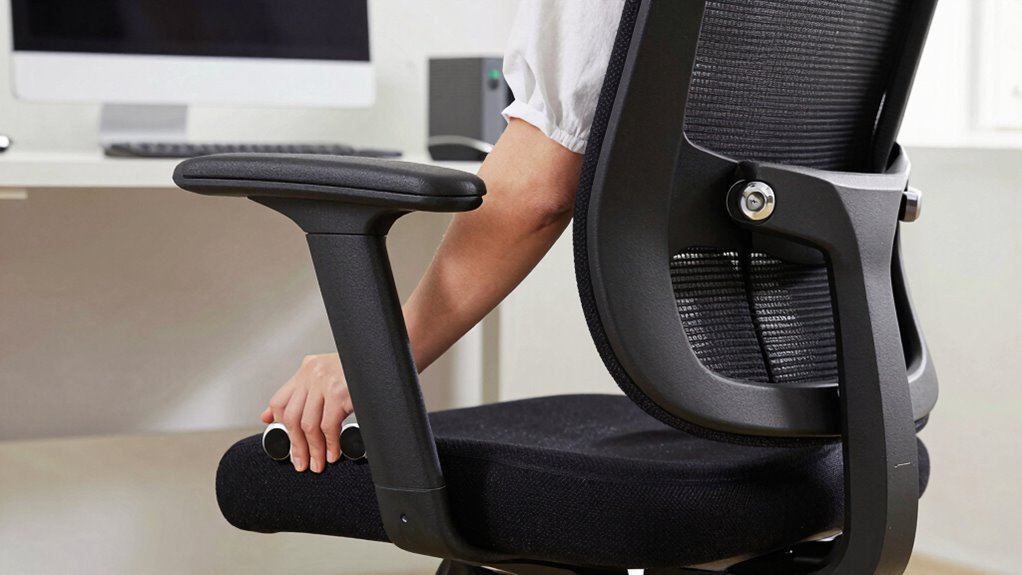
Have you properly adjusted your seat height and depth to guarantee ideal comfort and posture? Start by setting the seat height so your feet rest flat on the floor, with your knees at a 90-degree angle. This ensures your seat cushion provides proper leg support without putting pressure on your thighs. Next, adjust the seat depth so there’s a small gap—about two to three inches—between the back of your knees and the front edge of the chair. This helps distribute your weight evenly across the seat cushion and prevents restricted blood flow. Proper seat depth also encourages better spinal alignment and reduces strain on your lower back. Making these adjustments creates a stable foundation for your posture, reducing fatigue and discomfort throughout your workday. Additionally, understanding content formats can help you customize your workspace for optimal ergonomic benefits. For example, familiarizing yourself with ergonomic principles can guide you in making comprehensive adjustments that promote comfort and productivity. Paying attention to adjustment techniques can further enhance your ergonomic setup and overall comfort during long periods of sitting. Ensuring your supportive features are properly aligned can also significantly improve your ergonomic experience and ergonomic comfort is essential for maintaining long-term health and productivity.
Customize Armrests and Tension to Reduce Strain

Adjusting your armrests and tension settings can substantially reduce strain during long work sessions. Proper armrest height and padding support your arms and shoulders, preventing fatigue and improving keyboard comfort. If your armrests are too high or too low, you’ll strain your neck or shoulders; fine-tune them to match your desk height and arm length. Additionally, customizing tension—such as the tilt or recline resistance—helps you stay comfortable and reduces back or neck tension. Make sure the tension isn’t too stiff or too loose, so you can adjust your chair easily without exerting extra effort. By tailoring armrest padding and tension, you keep your muscles relaxed, maintain better posture, and avoid discomfort, ensuring you stay productive and pain-free during extended work hours. Incorporating ergonomic performance adjustments can further enhance your comfort and prevent long-term strain. Regularly monitor your posture to identify areas where your ergonomic setup may need refinement, helping you maintain optimal support. Understanding how ergonomic features influence your overall comfort can guide you in making more effective adjustments. Moreover, paying attention to individual body needs ensures your ergonomic setup continues to support your unique posture and reduce strain effectively. Remember to periodically check and fine-tune your chair settings to adapt to your changing needs and maintain optimal ergonomic support.
Frequently Asked Questions
How Often Should I Readjust My Ergonomic Chair Settings?
You should readjust your ergonomic chair settings whenever your posture feels uncomfortable or after changing tasks. For frequent posture shifts, it’s good to reevaluate your settings weekly to maintain ergonomic habits. Regular adjustments help prevent strain and promote comfort. Don’t wait too long—making small, consistent tweaks guarantees you stay aligned and supported throughout the day, reducing fatigue and discomfort. Stay proactive with your chair to support your overall well-being.
Can Ergonomic Chairs Help Alleviate Existing Back Pain?
Yes, ergonomic chairs can help alleviate existing back pain by providing proper lumbar support and promoting posture correction. When you sit correctly, your spine stays aligned, reducing strain and discomfort. Adjustable features let you customize the chair to fit your body, targeting pain areas effectively. Keep in mind, though, that combining ergonomic seating with regular movement and stretches maximizes relief and supports long-term back health.
Are There Specific Brands Known for Easy Knob Adjustments?
Yes, some brands are known for their easy knob adjustments, making your ergonomic chair more user-friendly. Brands like Steelcase, Herman Miller, and Autonomous have a strong reputation for quality and adjustment simplicity. You’ll find their adjustment knobs intuitive, allowing you to customize your chair effortlessly. Picking a chair from these brands guarantees you get reliable, easy-to-use features that support your back and comfort all day long.
What’s the Best Way to Test a Chair’s Adjustability Before Buying?
To test a chair’s adjustability, sit in it and focus on your ergonomic posture. Adjust the knobs to find comfort zones for your seat height, backrest angle, and armrests. Move around to ensure smooth, easy adjustments without resistance. Make sure the chair supports your lower back and promotes good posture. If it feels customizable and comfortable in these zones, it’s likely a great fit for long-term use.
How Do I Know if My Chair’s Adjustments Are Correctly Set?
You’ll know your chair’s adjustments are correct when your posture feels natural and comfortable. Focus on posture awareness; your feet should rest flat on the ground, your knees at a 90-degree angle, and your back fully supported. Check adjustment accuracy by ensuring the lumbar support aligns with your lower back, the armrests support your arms comfortably, and your seat height allows your hips to be slightly higher than your knees.
Conclusion
By adjusting the lumbar support, seat height, and armrests, you create a workspace that supports your back, encourages good posture, and reduces strain. When you make these simple changes, you improve comfort, boost focus, and prevent pain. Take control of your sitting experience, embrace these adjustments, and let your back thank you. Because a healthier, happier posture starts with just three small tweaks—so you can work better, feel better, and stay better, every day.
NFL season / tailgating Picks
team gear
As an affiliate, we earn on qualifying purchases.