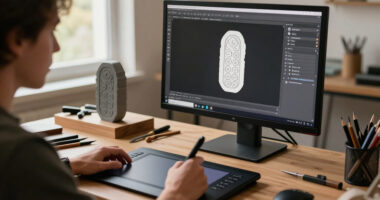
🔍 Read the full analysis: Which Of These 8 Drawing Tablets Suits Your Art In 2027? on ThorstenMeyerAI.com

Get the little things that make your day delivered free with Prime
- Fast, free delivery on millions of items
- Prime Video, Amazon Music and more included
- Member-only deals all year
TL;DR
A ThorstenMeyerAI.com buyer’s guide compares eight drawing tablets for 2027, from computer-connected screen tablets to compact pen tablets and standalone devices. It names the HUION Kamvas 13 (Gen 3) as its overall pick, but the best fit depends on workspace, portability, software compatibility and how you prefer to draw.
ThorstenMeyerAI.com’s 2027 buyer’s guide compares eight drawing tablets for different ways of working, naming the HUION Kamvas 13 (Gen 3) its best overall pick for artists who want a computer-connected display and dial controls. The guide also highlights screenless and standalone alternatives, arguing that the right choice depends on setup, work area and software needs—not just pen specifications.
The guide’s top selection, the Kamvas 13 (Gen 3), is a screen tablet that connects to a computer. The source describes its combination of direct-on-display drawing and dual dials as a strength, while noting that buyers need a compatible computer and suitable connection. It does not provide independent test results or a detailed comparison of performance across software.
For buyers who already use a computer and prefer a screenless tablet, the guide points to the HUION Inspiroy H1060P as a value option with a larger work area than the compact H640P and Wacom Intuos Small, among other drawing tablet options. It identifies the Frunsi RubensTab T11 Pro and PicassoTab A10 as standalone choices for supported drawing tasks, while cautioning that app availability and workflow may differ from computer-based setups.
The eight products covered are the HUION Kamvas 13 (Gen 3), HUION Inspiroy H1060P, HUION H640P, Wacom Intuos Small, two XP-Pen Artist 13.3 Pro V2 listings, Frunsi RubensTab T11 Pro and PicassoTab A10. The source says the two XP-Pen listings appear closely related, and advises comparing the exact version, specifications and included accessories before choosing between them.
The 8 picks
- 1
 HUION Kamvas 13 (Gen 3) 13.3-Inch Drawing Pen Display with Dual Dial and StandView on Amazon →
- 2
 PicassoTab 10" Standalone Drawing Tablet (A10)View on Amazon →
- 3
 XP-Pen Artist 13.3 Pro V2 Drawing Tablet with Screen, 16K Pressure Levels, Re…View on Amazon →
- 4
 XPPen Artist 13.3 Pro V2 Drawing Tablet with ScreenView on Amazon →
- 5
 Frunsi RubensTab T11 Pro Standalone Drawing TabletView on Amazon →
- 6
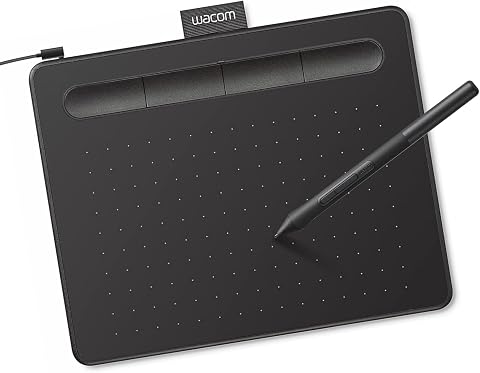 Wacom Intuos Small Wired Drawing Tablet with PenView on Amazon →
- 7
 HUION Inspiroy H1060P Graphics Drawing Tablet, 10 x 6.25 inView on Amazon →
- 8
 HUION Inspiroy H640P 6 × 4-Inch Drawing Tablet with Battery-Free StylusView on Amazon →
Matching Tablets to Art Workflows
The comparison matters because these products do not all serve the same purpose. A screen tablet lets artists draw where the image appears, while a screenless pen tablet places the artwork on a separate monitor and a standalone device can reduce reliance on a computer for supported apps. Those differences affect setup, portability, cost and the way a person works day to day.
The guide also emphasizes that a larger active area may suit broad arm movements, while a compact tablet can be easier to carry or fit on a small desk. Shortcut keys and dials can help with repeated commands, but only if they fit the user’s habits. Checking operating-system, connection and app compatibility before purchase can prevent a mismatch that advertised pen features alone will not resolve.
Products Worth Considering

Bose Lifestyle Ultra Wireless Home Speaker, White Smoke

Dyson Airwrap i.d. 6-in-1 Multi-Styler and Dryer

Levoit Core 600S-P Smart Air Purifier for Large Rooms
As an affiliate, we earn on qualifying purchases.
Three Ways to Draw Digitally
The guide organizes the options around three common configurations: display tablets connected to a computer, screenless tablets used alongside a monitor, and standalone tablets. Each involves a different tradeoff. A display tablet offers direct visual placement but needs a compatible computer and display connection; a pen tablet may cost less and occupy less of the screen workflow, but takes practice for some users; standalone models avoid a computer connection for supported tasks but may have different software options.
Its selection method gives weight to workspace, portability, controls and setup requirements, rather than ranking products solely by technical specifications. The source presents the order as a practical fit assessment, not evidence that the highest-ranked device is best for every artist. It also treats the duplicate XP-Pen listings cautiously because their names alone may not establish what differs between packages.
“The main tradeoff is between drawing directly on a display, using a more affordable pen tablet with a separate computer screen, or paying for a self-contained tablet.”
— ThorstenMeyerAI.com buyer’s guide
Specs and Listing Differences
The supplied source does not give a publication date, prices, full technical specifications, testing procedures or links to product listings. It also does not establish whether the two XP-Pen Artist 13.3 Pro V2 listings differ in hardware, bundle contents or seller details. Readers should verify the exact product version, accessories, current price and compatibility with their own computer or apps.
The guide’s descriptions of value and suitability are editorial judgments rather than a disclosed independent lab test. Its recommendations do not establish how each tablet performs with every drawing program, operating system or individual working style. The source also does not specify which apps are supported on the standalone models, so that point remains a buyer-specific check.
Verify Your Setup Before Buying
The source does not announce a follow-up test or a future product launch. For readers considering one of the eight devices, the practical next step is to check the manufacturer’s current compatibility information, required cables or adapters, supported drawing apps and package contents. Those details may vary by model and seller.
Buyers can then narrow the list by deciding whether they need a display, how much drawing area they use, whether they already own a suitable computer and how often they carry their equipment. The guide’s recommendations are best treated as a starting comparison; current prices and exact specifications should be checked before purchase.
Key Questions
Which tablet does the guide recommend overall?
The guide names the HUION Kamvas 13 (Gen 3) its overall pick, particularly for artists who want to draw on a display and use dial controls. It still requires a compatible computer and connection.
Which option is aimed at buyers who already have a computer?
The guide describes the HUION Inspiroy H1060P as a value-oriented screenless option with a larger work area than the H640P and Wacom Intuos Small. Its image appears on a separate computer display.
Are the two XP-Pen listings different products?
The source says they appear to be closely related but does not establish their exact differences. Compare the specific version, listed specifications and included accessories before buying.
What should I check before choosing a standalone tablet?
Confirm that the drawing apps you use are available and suitable for the device, and check whether its workflow meets your needs. Standalone use can reduce reliance on a computer, but the source does not say these models support every desktop app.
Source: ThorstenMeyerAI.com