
This checklist is for anyone setting up a desk for workday comfort, from long hours in a home office to a flexible everyday workspace. It brings together six essentials, with a specific pick for each slot.

Get the little things that make your day delivered free with Prime
- Fast, free delivery on millions of items
- Prime Video, Amazon Music and more included
- Member-only deals all year
The sections follow the items in the list: seating, laptop positioning, typing, lighting, audio, and hydration. Each one explains why the item matters and what to check before choosing the named pick.
Use the checklist to compare your current setup with your daily needs. Check fit and compatibility before buying, and prioritize the items that address the most persistent gaps in your workspace.
Ergonomic Office Chair
A chair is the foundation of a desk setup because it supports the way you sit through the workday. The ELABEST X100 Ergonomic Mesh Office Chair with Footrest and 5D Flip-Up is the pick for this slot. Before choosing it, consider how much time you spend seated, whether you need a footrest, and how its flip-up feature would work with your desk and routine.
A common mistake is focusing on a feature list without checking whether the chair fits your body and workspace. Confirm the available adjustment range against your preferred seating position, desk height, and legroom. Check the chair’s overall dimensions and make sure there is room to move it in and out without obstructing a doorway or nearby furniture.
Also consider how the mesh construction and included features suit your preferences. If possible, review the listed dimensions and adjustment details before ordering, and check that the chair can be assembled where you plan to use it. A good fit means the chair works with your desk and posture, rather than asking you to adapt your whole workspace to it.
What to look for:
- Check chair dimensions against your available floor space.
- Compare adjustment details with your desk height and seating position.
- Confirm the footrest suits your legroom and routine.
- Check that the flip-up feature clears nearby furniture.
- Review assembly requirements for the room where it will be used.
ELABEST X100 Ergonomic Mesh Office Chair with Footrest and 5D Flip-Up Arms

The ELABEST X100 is a high-back ergonomic office chair featuring a dynamic 3D lumbar support system and a breathable Dual-Stripe AirMesh design for all-day comfort. It includes 5D flip-up armrests, an extendable footrest, and a 3D adjustable headrest to support proper posture during work or gaming.
Pros:
- Dynamic 3D lumbar support with spring-loaded auto-tracking mimics natural spine curvature
- 5D flip-up armrests save space and offer extensive adjustability (height, width, rotation)
- Dual-Stripe AirMesh provides superior airflow and elasticity compared to standard mesh
- Includes an extendable footrest and 3D headrest for seamless work-to-relaxation transitions
Cons:
- Customizing seat height beyond the standard range requires contacting the manufacturer
- Complex adjustability features may have a learning curve for initial setup
Best for: People who want a chair with a footrest and flip-up feature
Not ideal for: Anyone who cannot confirm the chair’s dimensions or fit
Bottom line: Check the dimensions and adjustments against your desk before choosing the ELABEST X100.
Adjustable Laptop Stand
A laptop stand can help bring the screen to a more convenient position and free you to arrange your desk around the way you work. The Tounee Telescopic Laptop Stand with 360° Swivel Base, Gray is the pick here. Its telescopic design and swivel base are the key features to assess against your laptop, desk, and preferred viewing position.
One common buying mistake is assuming every stand fits every laptop. Check the stand’s stated supported device dimensions and weight against your laptop, and confirm that its base will fit on your desk. Consider how much height adjustment you need and whether the stand can be positioned without blocking your keyboard, trackpad, or other desk items.
The 360° swivel base may be useful if you reposition your screen during the day, but allow enough clearance for the laptop to turn. Think through cable reach and where the laptop’s ports will sit when elevated. If you type directly on the laptop, consider whether the raised position feels workable for your hands; an external keyboard may suit a different arrangement. Prioritize stable placement and screen height that fit your setup.
What to look for:
- Match the supported laptop dimensions and weight to your device.
- Measure desk space for the base and full swivel movement.
- Check the telescopic height range against your viewing position.
- Consider cable reach and access to laptop ports.
- Decide whether you will type on the laptop or use an external keyboard.
Tounee Telescopic Laptop Stand with 360° Swivel Base, Gray

This telescopic laptop stand adjusts from 2.1 to 21 inches to support seated or standing work. Its 360° swivel base, foldable design, and aluminum alloy construction provide flexible positioning and compact storage.
Pros:
- Adjustable height supports seated and standing positions
- 360° rotating base allows flexible screen positioning
- Aluminum alloy construction with a large base and two pivot joints
- Folds for storage and is compatible with 10–17-inch laptops
Cons:
- Designed for laptops within the 10–17-inch size range
- The stand itself takes up desk space while in use
Best for: Laptop users who want adjustable height and swivel positioning
Not ideal for: Anyone whose laptop or desk does not fit the stand’s stated dimensions
Bottom line: Confirm device support, desk clearance, and cable reach before setting up the Tounee stand.
Wireless Keyboard
A keyboard shapes how your hands meet the desk throughout the day, so layout and wrist support deserve a close look. The Logitech ERGO K860 Wireless Ergonomic Split Keyboard with Wrist Rest is the listed pick. Its split design and wrist rest make it important to consider your typing habits, desk depth, and how much room you have in front of your screen.
A common mistake is buying an ergonomic layout without allowing time and space to adjust to it. Check the keyboard’s footprint against your desk and make sure the wrist rest does not push your seating position too far back. Compare its connection requirements with your computer, including supported wireless options and whether any receiver or software is needed for your setup.
Think about what you use alongside the keyboard, such as a mouse or laptop stand, and plan for a comfortable reach between them. If you switch between multiple devices, verify how the keyboard connects and whether that matches your routine. A wrist rest is useful only if it aligns with where your hands naturally rest, so consider desk position and typing fit before committing to the split layout.
What to look for:
- Measure the keyboard footprint and wrist-rest depth against your desk.
- Check wireless connection options against your computer.
- Verify any receiver or software requirements for your setup.
- Plan comfortable reach to your mouse and other desk controls.
- Consider whether a split layout matches your typing habits.
Logitech ERGO K860 Wireless Ergonomic Split Keyboard with Wrist Rest

The Logitech ERGO K860 features a curved, split keyframe and pillowed memory foam wrist rest to support a more natural typing posture. Its adjustable palm lift, scooped keys, full-size layout, and integrated number pad are designed for comfort and precise typing.
Pros:
- Curved split design and adjustable palm lift support a more natural typing posture.
- Pillowed memory foam wrist rest provides additional wrist support.
- Bluetooth and USB receiver connectivity support flexible device connections.
- Scooped keys, full-size layout, and integrated number pad support comfortable, precise typing.
Cons:
- The ergonomic split layout may require an adjustment period.
- Requires two batteries.
Best for: People seeking a wireless split layout with an integrated wrist rest
Not ideal for: Anyone short on desk depth or unwilling to adapt to a split layout
Bottom line: Make room for the keyboard and confirm its connection requirements before choosing the K860.
Desk Lamp
Lighting affects how your desk feels and how easily you can arrange the space for different tasks. The listed pick is the Govee RGBIC Floor Lamp Basic, 1,000-Lumen LED Corner Lamp. Since it is a floor lamp intended for a corner, check the room layout and placement before treating it as a desk lamp replacement.
A common mistake is choosing lighting by its stated output alone. Consider whether the lamp can be positioned to light your work area without shining directly into your eyes or screen. Check the available floor space, the position of nearby outlets, and the cord route so the lamp does not interfere with chair movement or create a trip hazard. Confirm whether its controls and lighting options suit the way you use your desk.
Because this is a floor lamp, it may serve as room or corner lighting rather than a focused task light directly over paperwork or a keyboard. Decide whether that matches your need, or whether you also require a separate desk light. Think about the room’s existing lighting and the color options you would actually use. A practical choice starts with placement and task needs, then checks that the lamp’s features fit the space.
What to look for:
- Measure the corner or floor area where the lamp will stand.
- Plan outlet access and a cord route clear of foot traffic.
- Check that the light can illuminate the desk without screen glare.
- Decide whether corner lighting is enough for close-up tasks.
- Review the controls and lighting options against your routine.
Govee RGBIC Floor Lamp Basic, 1,000-Lumen LED Corner Lamp

This 53.7-inch floor lamp produces up to 1,000 lumens and displays customizable multicolor effects with RGBIC technology. Control it through the Govee Home app or compatible voice assistants, and use music sync, 85 dynamic scenes, or DIY lighting effects to personalize a room.
Pros:
- Customizable multicolor effects with 16 million colors
- Supports app and voice control
- Music sync and 85 dynamic scene modes
- Freestanding design can be moved between rooms
Cons:
- Maximum brightness of 1,000 lumens is suited to corners and smaller spaces
- Remote control is not included
- Supports 2.4 GHz Wi-Fi only
Best for: People who want a floor lamp to add light near a desk
Not ideal for: Anyone who needs only a compact, directly focused desk lamp
Bottom line: Check floor placement and task lighting needs before choosing the Govee lamp.
Noise-Canceling Headphones
Headphones can make it easier to choose how you listen and manage sound around a desk. The pick is the Bose QuietComfort Wireless Noise Cancelling Headphones, Petal Pink. Before choosing them, consider your listening routine, the devices you use, and whether over-ear headphones fit comfortably for the length of your sessions.
A common mistake is assuming wireless headphones will connect seamlessly with every device or suit every work call. Check the supported connection options for your computer and phone, and review microphone and call controls if you plan to use them for meetings. Think about whether you need to switch between devices and confirm the headphones support the way you intend to do that.
Fit matters as much as features: consider how the ear cups feel, whether you wear glasses, and how the headband sits during extended use. Check the listed battery and charging details against how often you expect to use them away from a charger. Noise cancellation may suit listening in a noisy environment, but it does not replace checking call compatibility or comfort. Choose based on device fit and daily use, including the color and controls you prefer.
What to look for:
- Confirm wireless compatibility with your computer and phone.
- Review microphone and call controls if using them for meetings.
- Check device switching behavior against your listening routine.
- Consider ear-cup and headband comfort, including with glasses.
- Compare battery and charging details with your typical use.
Bose QuietComfort Wireless Noise Cancelling Headphones, Petal Pink
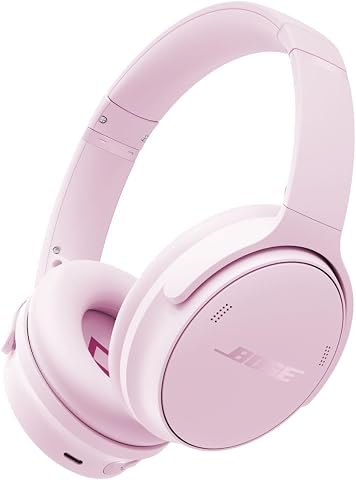
These over-ear Bluetooth headphones combine active noise cancellation with Quiet and Aware listening modes, adjustable EQ, and high-fidelity audio. They offer up to 24 hours of battery life, USB-C charging, multipoint Bluetooth connectivity, and an included cable for wired listening.
Pros:
- Active noise cancellation with Quiet and Aware modes
- Adjustable EQ for bass, mid-range, and treble
- Up to 24 hours of battery life with USB-C quick charging
- Multipoint Bluetooth and included wired listening option
Cons:
- Wired listening requires the included audio cable
- USB-C cable is 12 inches long
Best for: People seeking wireless headphones with noise cancellation
Not ideal for: Anyone whose devices or call needs do not match the listed features
Bottom line: Check connection support, call features, and comfort before choosing the Bose QuietComfort headphones.
Reusable Water Bottle
A water bottle at your desk can keep a refillable drink within reach during the day. The listed pick is the YETI Rambler 36 oz Stainless Steel Bottle with Chug Cap, Black. Its capacity, material, and cap style are the main points to match with your habits and workspace.
A common mistake is choosing a bottle by capacity without checking how it fits where you plan to keep it. Measure your desk area, bag pocket, and any cup holder you use, then compare those measurements with the bottle’s listed dimensions. Consider whether the 36-ounce size is comfortable to carry when full and whether you are willing to refill a larger bottle less often.
Check the chug cap’s use and cleaning instructions, especially if you prefer a different drinking opening or need to clean every part regularly. Confirm how the bottle should be washed and whether it fits your preferred cleaning routine. Stainless steel may suit your material preference, while the black finish is a style choice. Decide based on capacity and everyday handling, and make sure the bottle has a convenient, stable place at your desk.
What to look for:
- Compare the bottle’s dimensions with your desk, bag, and cup holder.
- Consider whether the 36-ounce capacity suits your carrying and refill habits.
- Check the chug cap’s use and cleaning instructions.
- Confirm washing guidance fits your cleaning routine.
- Choose a finish and material you are comfortable using daily.
YETI Rambler 36 oz Stainless Steel Bottle with Chug Cap, Black

This 36 oz vacuum-insulated stainless steel bottle has a leakproof Chug Cap with a TripleHaul Handle that opens with a half-twist for quick sipping. It is double-wall insulated, sweatproof, shatter resistant, and dishwasher safe.
Pros:
- Leakproof cap opens with a half-twist for quick sipping
- Double-wall vacuum insulation
- Sweatproof and shatter resistant
- Dishwasher safe
Cons:
- Availability can vary
Best for: People who want a 36-ounce stainless steel bottle for the desk
Not ideal for: Anyone who needs a smaller bottle or a different cap style
Bottom line: Check the bottle’s dimensions and care instructions against your everyday routine.
Set your buying order by the gaps that affect your day most: first check chair and screen fit, then address typing comfort and lighting, followed by headphones and a bottle if those suit your routine. Measure your workspace and confirm device compatibility before selecting the matching items.
You do not have to change your whole setup at once. Choose one item that answers a clear need, give it a place in your routine, and use the checklist to guide the next decision. A few well-matched essentials can make your desk feel more considered and easier to use.